` and its output. A command still running at its timeout is stopped, with its process group, and the output says so. It reaches the desktop, so `agent-browser` and `agent-desktop` work from it. |
| `computer_terminal` | `text`, typed as is; `keys`, named, such as `Enter`, `Tab`, `Escape`, `Up`, or `C-c`; `wait`, in seconds: 1 unless given, 30 at most | Sends them to the terminal, the tmux session `main`, waits, and answers its last 200 lines. For a program that asks and waits: a REPL, an installer’s prompts, `ssh`, `top` |
| `computer_desktop` | `action`, and what it needs, below | One action on the screen, then a screenshot |
| `computer_read_file` | `path`, `offset` (the first line, from 1), `limit` (lines, up to 2,000) | Text, 2,000 lines or 60 KB at a time, saying where the next part starts. An image (PNG, JPEG, GIF, or WebP, up to 3.75 MiB) comes back as an image, which the bot sees. |
| `computer_write_file` | `path`, and `text` (up to 1 MiB) or `library` (a `library:`); or `old_text` and `new_text` | Writes the text, or the library item’s bytes, making the folders it needs. With `old_text`, which must be in the file exactly once, changes that one place to `new_text`. Either way, a file that was there keeps its mode. |
| `computer_to_library` | `path`, and `name` | Saves an image (up to 3.75 MiB) or a text file (up to 1 MiB) to the bot’s library, tagged for the chat, and answers its `library:` |
| `computer_ask_owner` | `reason`, in one line | Hands the desktop to the owner for a step only they can do, as **Take over** does, and shows them the reason |
`computer_desktop`’s actions, in the screenshot’s own pixels:
| `action` | Needs |
| --------------------------------------------------------------------------- | ------------------------------------------------------------------------------------------------------------------------- |
| `screenshot`, `cursor_position` | Nothing |
| `left_click`, `right_click`, `middle_click`, `double_click`, `triple_click` | `coordinate`, `[x, y]`, or the cursor where it is; `text` for keys held during the click, such as `shift` or `ctrl+shift` |
| `mouse_move` | `coordinate` |
| `left_click_drag` | `start_coordinate` and `coordinate` |
| `scroll` | `scroll_direction`, `up`, `down`, `left`, or `right`; `scroll_amount`, 3 unless given; `coordinate` |
| `type` | `text` |
| `key` | `text`, a key or combination, such as `Return` or `ctrl+l` |
| `wait` | `duration` in seconds, 1 unless given, 30 at most |
| `zoom` | `region`, `[x1, y1, x2, y2]`: that part of the screen at its own size |
Each answer says what it did, the screen’s size, the active window’s title, and the cursor, with the screenshot, a PNG, or a JPEG when a PNG would be over 3.75 MiB. `screenshot: false` leaves out the image. A model that can’t see images gets the text, and libfx’s note that the image wasn’t sent. In a reply, a `computer_desktop` call shows its screenshot; fxbot keeps each bot’s last 50 in memory, so a reply from before fxbot restarted shows its text only.
While the owner has a computer, after **Take over** or `computer_ask_owner`, `computer_desktop` and `computer_terminal` answer that the owner has it. The shell and file tools go on. When the owner hands back after the bot asked, the bot’s chat gets a message from the computer, and the bot’s turn starts again.
* **Long output.** Output over 60 KiB comes back as its first 4 KiB and last 56 KiB, with a line saying how much was cut, and where the whole of it is, in `/tmp/fxbot/`. A tool’s result can be at most 64 KiB.
* **Servers.** A command started with `setsid cmd > log 2>&1 &` keeps running after its call, until the computer stops.
* **Calls at once.** A reply’s shell commands run one at a time, and its reads and writes run together. Different actors’ calls, such as a bot’s subagents’, run at once.
* **Skills.** When a bot reads a skill with files besides `SKILL.md`, its files are copied to `/skills//` on the bot’s computer before its next call, and the skill’s text says so.
## Skills and instructions
[Section titled “Skills and instructions”](#skills-and-instructions)
Each chat of a bot the computer is on for has a few lines in its instructions: which part of the computer to use for what, cheapest first, and to ask the owner before it sends, buys, signs in, or deletes. Other bots’ chats have none.
The plugin has three skills:
| Skill | What it covers |
| ---------- | -------------------------------------------------------------------------------------------------------------------------------------------------------------------------------------------------------------------------------------------------------- |
| `computer` | Which tool for which job, and how to act on a screen and check what happened. `$computer` in a message, or the screen button beside the message box, sends it with the message. |
| `browser` | Web pages with `agent-browser` 0.41.1, the version on the computer: how to open, read, fill, click, wait, and take screenshots, what to leave as it is on this computer, and what to do when a step fails. `agent-browser skills get core` has the rest. |
| `desktop` | Desktop apps with `agent-desktop` 1.1.0, by their accessibility trees: the commands, refs, when it’s safe to try a step again, and when to use `computer_desktop` instead. `agent-desktop skills get desktop` has the rest. |
## The desktop
[Section titled “The desktop”](#the-desktop)
Each computer is named for its bot, as its hostname, such as `bob-computer`, and runs a desktop: XFCE on an X display, `:1`, with a panel, the Thunar file manager, Chromium, and a terminal window on the tmux session `main`. Its VNC server listens on a unix socket in the computer, `/tmp/fxbot/vnc.sock`, and no computer listens on a TCP port.
* **The Computer screen**, `/computer/computers/`, shows the desktop through [noVNC](https://novnc.com) and the terminal through [xterm.js](https://xtermjs.org), over WebSockets at `/api/plugins/computer/desktop/` and `/api/plugins/computer/terminal/`. A bot’s key is its id, and `/computer/bots/`, from before 0.3.0, opens the same screen. The desktop is view-only until **Take over**; the terminal takes typing always. For a stopped computer, the screen has **Start it**.
* **Cursors.** Over the desktop, each bot, or each of a bot’s labelled sessions, that pointed at something has an arrow in its colour, with its name, what it last did, and how long ago. The newest is solid, and the others faded. A bot that last used the browser or an app’s accessibility tree, which move no pointer, shows as a label at the top left. They come from `computer_desktop`’s clicks, moves, drags, and scrolls, kept in memory, and cleared when the computer stops or is reset. Since 0.3.0.
* **The browser** is Chromium, run as root without its sandbox, with its profile in `/root/.config/chromium`, so sign-ins last. The `agent-browser` command starts it on the desktop when it isn’t running, brings its window to the front, and drives it over DevTools on `127.0.0.1:9222`, inside the computer.
* **A bot’s sessions at once,** such as its [subagents](/docs/how-to/hand-work-to-subagents/), since 0.4.0. A session a plugin labelled is an actor of its own on the bot’s computer, named “ · ”, such as “Ann · Curie”:
* Its arrow and its pill carry that name, and a `computer_desktop` result names the others while more than one of the bot’s actors has used the computer in the last 10 minutes.
* **Turns at the desktop and the terminal.** An actor holds each from its call until 20 seconds after its last, or its turn’s end. Another actor’s call waits for its turn, up to a minute, then answers “Ann · Curie is using the desktop…”. A room’s bots take turns already, so they never wait.
* **A tab each.** Its `computer_shell` calls get `AGENT_BROWSER_SESSION`, a name of its own, and `AGENT_BROWSER_PIN_TAB=1`, so its agent-browser commands stay on a tab of their own, which no one else’s take, with the bot’s sign-ins.
* **The shell** runs every actor’s calls at once.
* **Accessibility** is on for every app, so `agent-desktop` reads their trees.
* **Fonts** are DejaVu and Noto, which cover most scripts, but not Chinese, Japanese, Korean, or color emoji.
## A computer for another plugin
[Section titled “A computer for another plugin”](#a-computer-for-another-plugin)
Since computer 0.3.0, a plugin that needs the computer can name computers of its own, such as [a room’s](/docs/how-to/give-bots-a-computer/#give-a-room-a-computer). Each is named by a key, a word, a dash, and more, such as `room-1a2b3c4d`, which a bot’s id never is. The plugin provides, with `fx.provide`:
```ts
type ComputerProvider = {
/** The computer for a chat, or null for the bot's own. `name` makes its hostname: `-computer`. */
computerFor(call: { bot: string; session: string }): Promise<{ key: string; name: string } | null>;
/** Every computer it keeps, with its name; null while it can't tell. */
computers(): Promise<{ key: string; name: string }[] | null>;
};
```
* **Which computer a call uses.** Before each call, the computer asks each such plugin, in turn, for the chat the call is in. The first that names one wins; otherwise the bot’s own is used.
* **Its container and home** are `fxbot-computer-`, labelled `fxbot.by=`.
* **Keeping it.** A plugin’s computer goes when that plugin is removed, or when it runs and its `computers()` doesn’t list the key. One added but not running, or whose `computers()` answers null, keeps its own.
* **Shared.** The bots it names it for share it, taking turns. A `computer_desktop` result there says where the others last pointed: “Others on this computer: Ann clicked (412, 300) 2 min ago.” **Take over** pauses every bot’s desktop and terminal tools on it, and **Hand back** sends nothing: the owner tells the bot that asked to go on.
* **Routes,** under `/api/plugins/computer/computers//`, for the page: `state`, `cursors`, `start`, `stop`, `reset`, and `takeover`. A key no running plugin lists, and no bot’s id, gets 404.
## Settings
[Section titled “Settings”](#settings)
On its tab in **Settings**:
| Setting | Default | What it is |
| ------------- | --------------------------------------------------------------------------------- | --------------------------------------------------------------------------------- |
| `engine` | `/run/fxbot-computer/engine.sock`, then `/var/lib/fxbot-computer/run/engine.sock` | The engine’s socket |
| `memoryMiB` | 2048 | Memory for each computer, in MiB |
| `cpus` | 2 | CPUs for each computer |
| `idleMinutes` | 15 | Minutes without a call before a computer stops. One someone watches doesn’t stop. |
| `screen` | `1280x800` | The desktop’s size, width x height in pixels |
Each computer also has at most 512 processes, and 512 MiB of shared memory for browsers. A computer made with other sizes, or another screen, is made again with the new ones when it next starts; its home stays.
## The setup
[Section titled “The setup”](#the-setup)
The computer’s engine is set up by `host/setup.sh`, in the plugin’s files, run as root. When the plugin loads and finds no engine, it has the script run, once each time fxbot starts:
| fxbot runs | Who runs the script |
| -------------------------------- | --------------------------------------------------------------------------------------------------------------------------------------------------------------------------------------------------------------- |
| From a release install | The machine’s `fxbot` command, with `fxbot computer on`, which the plugin asks for through fxbot’s requests. It runs the script from the release’s own files, not the plugin’s folder, then starts fxbot again. |
| From a checkout, as root | The plugin, with `--user root` |
| From a checkout, as another user | Nobody: **Settings** › **Computer** shows the command, to run as root |
**Settings** › **Computer** shows the setup while it works, and why it failed, with **Try again**. `FXBOT_COMPUTER_NAME` names another user than `fxbot-computer`, for checks beside a real install.
The script’s options, for running it by hand:
| Option | What it does |
| -------------------------------------- | -------------------------------------------------------------------------------------------------------------------------------------------------------------------------------------------------------------------------------------------------- |
| none | A release install in `/opt/fxbot`, and `compose.computer.yaml` there, which gives fxbot’s container the socket’s folder and the user’s group. Before 0.3.2 it wrote `compose.override.yaml`: it takes its own lines out of that, and leaves yours. |
| `--user ` | A checkout: `` joins the user’s group, to reach the socket |
| `--engine podman` or `--engine docker` | This engine. Otherwise the one the user already runs rootless; then podman, when the distribution has 4.9 or newer; then the machine’s own Docker, when its packages run it rootless |
| `--name ` | Another user than `fxbot-computer` |
| `--install ` | Another release install than `/opt/fxbot` |
| `--remove` | Takes it all away: the user, its computers and files, the firewall, and `compose.computer.yaml`. The packages stay. |
What it sets up:
| Thing | Where |
| ------------ | ----------------------------------------------------------------------------------------------------------------------------------------------------------------------------------------------------------------------------------------------------------------------------------------------------------------------------------------------------------------------------------------------------------------------------------------------------------------------------------------------------------------------------------------------------------------- |
| Packages | Through apt, dnf, zypper, or pacman, each listed in `/etc/fxbot/packages`: `nftables`, and `curl` and `util-linux` when they’re missing; on apt, `uidmap` and `dbus-user-session`; with podman, `podman` and `passt`, and `slirp4netns` for podman 4; with docker, `docker-ce-rootless-extras` beside Docker’s `docker-ce`, `rootlesskit` beside Debian’s `docker.io`, `moby-engine-rootless-extras` beside Fedora’s `moby-engine`, or `docker-rootless-extras` beside openSUSE’s `docker`, and `slirp4netns`; where SELinux runs, `policycoreutils-python-utils` |
| The user | `fxbot-computer`, home `/var/lib/fxbot-computer`, 65,536 subordinate ids, lingering on |
| Limits | `/etc/systemd/system/user@.service.d/fxbot-computer.conf` delegates cpu, memory, and pids to it |
| The engine | Its socket at `/var/lib/fxbot-computer/run/engine.sock`. Podman starts when called and stops 5 seconds after; Docker’s rootless daemon runs all the time, and holds about 180 MB. |
| The firewall | `/etc/fxbot/fxbot-computer.nft`, loaded at boot by `fxbot-computer-firewall.service` |
| SELinux | Where it runs, podman’s storage in the user’s home takes `/var/lib/containers`’ labels (`semanage fcontext -e`), and fxbot’s container runs with its labels off, to reach the socket |
It stops before it changes anything when the machine runs cgroups v1, without which the limits would do nothing, or keeps its users from making user namespaces. Where podman is older than 4.9 and Docker can’t run rootless, as with Ubuntu 22.04’s `docker.io`, it stops with the fix: [Fix an install that stopped](/docs/how-to/fix-an-install/#the-computer).
## What a computer reaches
[Section titled “What a computer reaches”](#what-a-computer-reaches)
The firewall matches the connections of the user `fxbot-computer`, which are every connection its computers make.
| Reached | Refused |
| ------------------------------------ | ---------------------------------------------------------------------------------------------------- |
| The internet | This machine, at any of its addresses |
| DNS, through the machine’s resolvers | Its tailnet, `100.64.0.0/10` and `fc00::/7` |
| | Private networks: `10.0.0.0/8`, `172.16.0.0/12`, `192.168.0.0/16`, `169.254.0.0/16`, and `fe80::/10` |
| | Loopback, multicast, and fxbot’s containers |
A refused connection fails at once. To let a computer reach one address on your network, add a rule before the others in the `computers` chain of `/etc/fxbot/fxbot-computer.nft`, such as `ip daddr 192.168.1.20 tcp dport 8080 accept`, then run `sudo systemctl restart fxbot-computer-firewall`.
## The image
[Section titled “The image”](#the-image)
Every computer runs from one image, `localhost/fxbot-computer:-`, about 1.2 GB, made from Debian 13 slim with:
* `ca-certificates curl git python3 procps ripgrep jq unzip xz-utils`
* the desktop: TigerVNC’s `Xvnc`, XFCE, Thunar, `xfce4-terminal`, `tmux`, `xdotool`, `scrot`, and the accessibility bus
* `chromium`, and fonts: DejaVu and Noto
* [agent-desktop](https://github.com/vercel-labs/agent-desktop) 1.1.0 and [agent-browser](https://github.com/vercel-labs/agent-browser) 0.41.1, each checked against its SHA-256
A running computer holds about 120 MB at idle, and about 330 MB with a page open in Chromium.
**Two fxbots on one machine,** such as a checkout beside a release, share the engine. Each labels the computers, homes, and images it makes with an id of its own, kept in the plugin’s table, and lists, stops, deletes, and prunes only its own. A computer another fxbot made for a bot is left alone, and a call for it says so.
A plugin that needs the computer adds setup steps, which run as root with the network, in name order, after the computer’s own. The computer’s files go in last, so a step can’t replace them. The image is made again in the background when such a plugin is added, updated, or removed; a running computer moves to it the next time it starts. An image no computer uses is removed.
# Configuration
> fxbot's server reads its settings from environment variables. The key that seals secrets is a file, named by FXBOT_SECRET_KEY_FILE.
fxbot’s server reads its settings from environment variables. The key that seals secrets is a file, named by `FXBOT_SECRET_KEY_FILE`.
## Where they are set
[Section titled “Where they are set”](#where-they-are-set)
| Install | Where | Read by |
| -------------------------- | ------------------------------------------------------------------------------------------------------------------ | -------------------------------------------------------------------------------------------------------------------- |
| A release, from `setup.sh` | `/etc/fxbot/fxbot.env`, for optional settings such as `FXBOT_LISTS_URL`. The release’s compose file sets the rest. | The app’s container, through compose’s `env_file`. A change takes effect at the next `sudo systemctl restart fxbot`. |
| A checkout | The environment, or `.env` in the repository root. The environment wins. | The server and its commands. Vite reads no `.env`. |
In a release, the compose file sets these for the app, with the database password from `/opt/fxbot/.env`:
```sh
FXBOT_DATABASE_URL=postgres://fxbot:@db/fxbot
FXBOT_SECRET_KEY_FILE=/run/secrets/fxbot_key
FXBOT_DATA=/var/lib/fxbot/data
FXBOT_BACKUPS=/var/lib/fxbot/backups
FXBOT_CONTROL=/var/lib/fxbot/control
FXBOT_EMBED_URL=http://embed:8080/v1
```
These win over the same names in `fxbot.env`. The image sets `FXBOT_HOST=0.0.0.0` inside the container, and compose publishes its port on the machine’s 127.0.0.1. `/opt/fxbot/.env` holds the install’s own settings for compose, not the app’s: see [What setup.sh creates](/docs/reference/install-layout/).
In a checkout, `FXBOT_EMBED_URL` names the local embedder that `deploy/compose.dev.yaml` runs, `http://127.0.0.1:8081/v1`. Without it, there is no local embedder, and memory search uses words alone unless Settings picks a provider’s embedding model ([Choose where memory search’s vectors come from](/docs/how-to/memory-search/)).
## Variables
[Section titled “Variables”](#variables)
| Variable | What it is |
| --------------------------- | --------------------------------------------------------------------------------------------------------------------------------------------------------------------------------------------------------------------------------------------------------------------------------------------------------------------------------------------------------------------------------------------------------------------------------- |
| `FXBOT_DATABASE_URL` | Required. fxbot's Postgres, such as `postgres://fxbot:@127.0.0.1:5433/fxbot_dev` from `deploy/compose.dev.yaml` |
| `FXBOT_PORT` | The API's port. Default 8787, a release install's; `npm run dev` uses 8788 unless this is set in the shell |
| `FXBOT_HOST` | The address the API listens on. Default 127.0.0.1. fxbot's image sets 0.0.0.0, and compose publishes the port on the machine's 127.0.0.1 |
| `FXBOT_SECRET_KEY_FILE` | Required. A file outside the repo with 32 random bytes in base64. It seals every key and token fxbot stores |
| `FXBOT_VERCEL_CLIENT_ID` | Optional. fxbot's own Vercel OAuth app, for signing in with a Vercel account, in place of the one fxbot's list of providers names |
| `FXBOT_HF_CLIENT_ID` | Optional. fxbot's own Hugging Face OAuth app, a public one with no secret, for signing in with Hugging Face, in place of the one fxbot's list of providers names |
| `FXBOT_DATA` | Plugins' files. Chats from before 0.4.0, in its `sessions/`, move into the database on the first start, which renames the folder `sessions.moved`. Default `./data` |
| `FXBOT_CLIENT_METADATA_URL` | Optional. The project's published OAuth client document, for MCP servers that sign in with one. Without it, fxbot registers itself with each server |
| `FXBOT_MCP_REGISTRY` | Optional. The MCP registry that fxbot mirrors hourly for search, and that registry entries come from. Default GitHub's, `https://api.mcp.github.com` |
| `FXBOT_MCP_EVERYTHING` | Optional. The registry that Search everything asks, once per search. Default the official one, `https://registry.modelcontextprotocol.io` |
| `FXBOT_LISTS_URL` | Optional. The site that publishes fxbot's own lists of the plugins it vets: MCP servers, skills, and packages. fxbot reads its `mcp-registry.json`, `skills-registry.json`, and `plugins-registry.json` hourly, its list of providers, `providers-registry.json`, and `plugin-breaks.json`, what each release broke, and keeps the lists the release shipped with until a read succeeds. Default fxbot's site, `https://fxbot.sh` |
| `FXBOT_BACKUPS` | Where the database and `FXBOT_DATA` are backed up before migrations run. Default `./backups`. The backup uses `pg_dump`, which must be Postgres 17's |
| `FXBOT_CONTROL` | Set by a release install's compose file: the folder where the app asks the machine for updates. Without it, Settings doesn't update |
| `FXBOT_EMBED_URL` | Optional. The local embedder for memory search, an OpenAI-style address such as `http://127.0.0.1:8081/v1` from `deploy/compose.dev.yaml`. A release install's compose file sets it. Without it, there is no local embedder |
| `FXBOT_PLUGIN_DIRS` | Optional, for writing a plugin in a checkout. Plugin folders, separated by `:`, that fxbot adds on first sight and loads at start, unpinned. It loads one again a moment after its files change |
| `FXBOT_UPDATE_CHECK` | `off` stops the daily check for a newer release, which asks GitHub about the repository in `package.json` |
| `FXBOT_RELEASES_URL` | Optional. Where that check reads the newest release, in the shape of GitHub's `releases/latest`, for a fork or a mirror |
## The site
[Section titled “The site”](#the-site)
`npm run build-site` reads one variable of its own:
| Variable | What it is |
| ----------------- | ----------------------------------------------------------------- |
| `FXBOT_SITE_BASE` | The path the site is served under, such as `/fxbot/`. Default `/` |
# What setup.sh creates
> An install made by setup.sh. fxbot runs as three containers, from one compose file, under podman or docker: the app, its database, and the local embedder for memory search, which can be turned off.
An install made by [`setup.sh`](/docs/reference/commands/#setupsh). fxbot runs as three containers, from one compose file, under podman or docker: the app, its database, and the local embedder for memory search, which can be turned off.
## Files and folders
[Section titled “Files and folders”](#files-and-folders)
| Path | What it is | Owner, mode |
| -------------------------------------------------------------------- | ------------------------------------------------------------------------------------------------------------------------------------------------------------------------------------------------------------------------------------------------------------------------------------------------------------------------------------------------------------------------------------------------------------------------- | ------------ |
| `/opt/fxbot/` | The install | `root`, 755 |
| `/opt/fxbot/compose.yaml` | The release’s compose file: the app, its database, and the local embedder | `root` |
| `/opt/fxbot/compose.gpu.podman.yaml` or `compose.gpu.docker.yaml` | The release’s GPU file for the engine, which runs the local embedder on an NVIDIA GPU. The `fxbot` command adds it when `FXBOT_EMBEDDER` is `gpu`. | `root` |
| `/opt/fxbot/compose.docker.yaml` | On Docker: a check every 2 seconds while a service starts. The `fxbot` command adds it on Docker 25 and newer. | `root` |
| `/opt/fxbot/compose.computer.yaml` | The computer’s: it gives the app the computer’s engine socket and group, and, where SELinux runs, turns the app’s labels off. Its setup script writes it. | `root` |
| `/opt/fxbot/compose.override.yaml` | Yours, when you write one, such as to publish web pairing’s ports. The `fxbot` command adds it last, and nothing writes over it. | |
| `/opt/fxbot/computer-setup.sh` | The computer’s setup script, as `fxbot computer on` last ran it, which `fxbot uninstall` runs to take the computer away | `root` |
| `/opt/fxbot/docker-compose` | Compose’s own release, when the machine had no Compose new enough and its packages had none. | `root`, 755 |
| `/opt/fxbot/.env` | The install’s settings for compose: `FXBOT_VERSION`, `FXBOT_UID` and `FXBOT_GID` (the `fxbot` user’s), `FXBOT_ENGINE` (`podman` or `docker`), `FXBOT_EMBEDDER` (`cpu`, `gpu`, or `off`: where the local embedder runs), `FXBOT_PORT` (the port on the machine’s loopback), `FXBOT_COMPOSE` (the Compose binary to run, when `podman compose` or `docker compose` would run one too old), and a random `FXBOT_DB_PASSWORD` | `root`, 600 |
| `/opt/fxbot/fxbot` | The [`fxbot` command](/docs/reference/commands/#fxbot), linked as `/usr/local/bin/fxbot` | `root`, 755 |
| `/opt/fxbot/.update.lock` | Held while an update runs, so a second one waits | `root` |
| `/etc/fxbot/` | The settings and the key | `root`, 755 |
| `/etc/fxbot/secret.key` | 32 random bytes in base64, which seal every stored secret. Compose mounts it into the app, read-only, at `/run/secrets/fxbot_key`. | `fxbot`, 400 |
| `/etc/fxbot/packages` | What `setup.sh` and the computer’s setup installed: the package manager on the first line, then a package, or a file of Docker’s repository, on each, for `fxbot uninstall` to name | `root` |
| `/etc/fxbot/fxbot.env` | The app’s optional [settings](/docs/reference/configuration/), such as `FXBOT_LISTS_URL` | `root` |
| `/var/lib/fxbot/` | The `fxbot` user’s home | `fxbot`, 700 |
| `/var/lib/fxbot/data/` | Plugins’ files (`FXBOT_DATA`). An install from before 0.4.0 also has `sessions.moved`, its chats’ old files, which the first start of 0.4.0 moved into the database. Delete it once you’re sure of the move. | `fxbot`, 700 |
| `/var/lib/fxbot/backups/` | Backups taken before migrations change a database in use, the last five (`FXBOT_BACKUPS`) | `fxbot`, 700 |
| `/var/lib/fxbot/control/` | The app’s requests, in `requests/`, for an update or a new place for the local embedder. The machine’s answers: `status.json`, which Settings shows during an update, and `embedder-status.json`, for a switch of the embedder (`FXBOT_CONTROL`) | `fxbot`, 755 |
| `/etc/systemd/system/fxbot.service` | Starts the containers at boot | `root` |
| `/etc/systemd/system/fxbot-control.path` and `fxbot-control.service` | Run `fxbot apply` when the app writes a request | `root` |
The app sees the three folders in `/var/lib/fxbot` at the same paths. Each mount takes `:z`, which labels it for containers where SELinux runs, as on Fedora, RHEL, and openSUSE, and does nothing where it doesn’t.
Each backup is a folder named `-before-`, holding `database.dump`, in pg_dump’s custom format, and `data.tar.gz`, the data folder. A start backs up once, before its first change. When only the tables that hold the chats change, the folder is named `-before-world-postgres-`. The update to 0.4.0 took `-before-0006_plugins`, whose `data.tar.gz` holds the chats’ old files. A 0.2 install that `setup.sh` moved into containers also has `-move-to-containers`, with the 0.2 database.
## The containers
[Section titled “The containers”](#the-containers)
The compose project is `fxbot`, with three services:
| Service | What it is |
| ------- | --------------------------------------------------------------------------------------------------------------------------------------------------------------------------------------------------------------------------------------------------------------------------------------------------------------------------------------------------------------------------------------------------------------------------------------------------------------------------------------------------------------------------------------------------------------------------------------------------------------------------------------------------- |
| `fxbot` | The app: `ghcr.io/iammrduncan/fxbot:`, for amd64 and arm64, with Node 22, the server, the built page, and Postgres 17’s `pg_dump`. It runs as the `fxbot` user’s ids, and listens on `127.0.0.1:8787` on the machine, or the port `FXBOT_PORT` names, the same inside the container as outside. `GET /api/health` answers `{"ok":true,"version":""}`. |
| `db` | The database: `pgvector/pgvector:0.8.7-pg17-trixie`, Postgres 17 with pgvector. Its database and role are both `fxbot`, with the password in `/opt/fxbot/.env`. Its data is in the named volume `pgdata`, not a folder on the machine. It has no port on the machine, and the app reaches it as `db`. |
| `embed` | The local embedder for memory search: llama.cpp’s server, `ghcr.io/ggml-org/llama.cpp:server-b12033`, with EmbeddingGemma 2 (`ggml-org/embeddinggemma-2-GGUF:Q8_0`). On its first start, it downloads the model, 310 MB, into the named volume `models`. It holds about 380 MB of memory, and runs at a low CPU weight (`cpu_shares: 256`), so it gives way to the rest. It has no port on the machine, and the app reaches it at `http://embed:8080/v1` (`FXBOT_EMBED_URL`). With the GPU file, it runs `server-cuda-b12033` with Qwen3-Embedding-0.6B (`Qwen/Qwen3-Embedding-0.6B-GGUF:Q8_0`) instead. With `FXBOT_EMBEDDER=off`, it doesn’t run. |
| Setting | Value |
| -------- | ----------------------------------------------------------------------------------------------------------------------------------------------------------------------------------------------------------------------------------- |
| Restarts | After a crash (`restart: unless-stopped`) |
| Stops | The app gives running chats 30 seconds to finish, and one still running goes on when it starts again. The container is stopped after 90 seconds at most, and the database after a minute |
| Health | The app when its port answers, which it opens after its migrations. The database when `pg_isready` answers. The embedder when its `/health` answers. The app doesn’t wait for the embedder, and searches by words until it answers. |
| Log | `sudo fxbot logs`, or one container’s, such as `sudo fxbot logs fxbot`, `sudo fxbot logs db`, or `sudo fxbot logs embed` |
## The services
[Section titled “The services”](#the-services)
| Unit | What it does |
| ----------------------- | ---------------------------------------------------------------------------------------------------------------------------------------------------------- |
| `fxbot.service` | Runs `fxbot up` at boot, after the network and podman’s socket (or docker), and `fxbot down` when it stops. `sudo systemctl restart fxbot` restarts fxbot. |
| `fxbot-control.path` | Watches `/var/lib/fxbot/control/requests`, and starts `fxbot-control.service` when the app writes a request |
| `fxbot-control.service` | Runs `fxbot apply` |
The user `fxbot` is a system user, with its home in `/var/lib/fxbot` and no login shell. The app’s container runs as its ids, so the files the app writes are the user’s.
## Packages
[Section titled “Packages”](#packages)
Through whichever of apt, dnf, zypper, or pacman the machine has:
* `ca-certificates`, and `curl` when there’s none
* **an engine,** when the machine has neither podman 4 or newer nor Docker: `podman` when the distribution has 4.9 or newer, or else Docker’s own `docker-ce`, `docker-ce-cli`, `containerd.io`, and `docker-compose-plugin`, from Docker’s repository, added as `/etc/apt/sources.list.d/docker.sources` with its key in `/etc/apt/keyrings/docker.asc`
* **with podman,** `netavark`, `aardvark-dns`, and `nftables`, which containers find each other by name through and podman only recommends, and `golang-github-containernetworking-plugin-dnsname` for a podman that has run on CNI, as Debian 12’s does out of the box
* **Compose,** when the machine has none 2.26 or newer: the distribution’s package when it’s new enough (`docker-compose-plugin`, `docker-compose-v2`, or `docker-compose`), or else Compose 2.40.3 from its releases, as `/opt/fxbot/docker-compose`, checked against its SHA-256
apt installs without its recommends, after `apt-get update`, and `setup.sh` stops instead when apt would remove a package. dnf and zypper install without weak dependencies, and pacman with `--needed`, on the package lists the system has. Each package that wasn’t there before goes in `/etc/fxbot/packages`. With podman, `setup.sh` enables `podman.socket`, which Compose reaches podman through. It installs nothing for a GPU: the local embedder on one needs NVIDIA’s driver and container toolkit, which you install yourself ([On a GPU](/docs/how-to/memory-search/#on-a-gpu)).
## Firewalls
[Section titled “Firewalls”](#firewalls)
On podman, the containers ask their network’s own DNS server for each other’s names, on the bridge’s port 53. Each `fxbot up`:
* **with ufw active,** lets port 53 in on podman’s bridge for fxbot’s network, as a rule marked `fxbot`
* **with firewalld running,** turns on `netavark-firewalld-reload.service`, which puts podman’s rules back after each `firewall-cmd --reload`
Docker needs neither. `fxbot uninstall` removes the ufw rules marked `fxbot`, and leaves netavark’s unit on, for podman’s other networks.
`sudo fxbot uninstall` removes all of this but `/var/lib/fxbot`, `/etc/fxbot`, and the user `fxbot`, which `--purge` removes too, and the packages, which it names: see [Uninstall fxbot](/docs/how-to/uninstall/).
## After a move from 0.2
[Section titled “After a move from 0.2”](#after-a-move-from-02)
`setup.sh` leaves what 0.2 used until you remove it: `/opt/fxbot/repo`, `/opt/fxbot/releases`, `/opt/fxbot/current`, the 0.2 unit and settings kept as `/opt/fxbot/fxbot-0.2.service` and `/opt/fxbot/fxbot-0.2.env`, and the machine’s Postgres with its `fxbot` database. `sudo fxbot status` prints the commands that remove them.
# Providers
> Every provider on Add provider, in Settings › Providers: how each connects, its address, where its models come from, and where its key is checked. Each bot runs on one provider.
Every provider on **Add provider**, in **Settings** › **Providers**, and in first-run setup. Each bot runs on one provider. To add one, see [Add a provider](/docs/how-to/add-a-provider/), and each provider’s own page.
| Provider | Connects with | Address | Models from | Key checked at |
| --------------------------------------------- | ------------------------------------------------------ | ------------------------------------------------------------------------------------------------ | ------------------------------------------------------- | ------------------------------------------------------------------------------------- |
| [Vercel](/docs/providers/vercel/) | Sign in by device code, then a team | AI Gateway | AI Gateway’s list | No key: a sign-in |
| [ChatGPT and Codex](/docs/providers/chatgpt/) | Sign in by device code | ChatGPT’s Codex API | The Codex model list | No key: a sign-in |
| [Grok](/docs/providers/grok/) | Sign in by device code | Grok’s API | Grok’s model list | No key: a sign-in |
| [AI Gateway](/docs/providers/vercel/) | A key | AI Gateway | AI Gateway’s list | Its model list |
| [OpenAI](/docs/providers/openai/) | A key | `https://api.openai.com/v1` | models.dev | Its model list |
| [Anthropic](/docs/providers/anthropic/) | A key | `https://api.anthropic.com/v1` | Its own list | Its model list |
| [Google Gemini](/docs/providers/gemini/) | A key | `https://generativelanguage.googleapis.com/v1beta/openai` | Its own list | Its model list |
| [OpenCode Go](/docs/providers/opencode/) | A key | `https://opencode.ai/inference/go/openai/v1` | models.dev | `https://opencode.ai/inference/go/v1/models` |
| [DeepSeek](/docs/providers/deepseek/) | A key | `https://api.deepseek.com` | Its own list | Its model list |
| [OpenRouter](/docs/providers/openrouter/) | Sign in, back to fxbot’s page or with a code; or a key | `https://openrouter.ai/api/v1` | models.dev | `https://openrouter.ai/api/v1/key` |
| [Z.ai](/docs/providers/zai/) | A key | `https://api.z.ai/api/paas/v4` | Its own list | Its model list |
| [Qwen](/docs/providers/qwen/) | A key, with its region | `https://{endpoint}/compatible-mode/v1` | Its own list | Its model list |
| [Kimi](/docs/providers/kimi/) | A key, with its platform | `https://{host}/v1` | Its own list | Its model list |
| [MiniMax](/docs/providers/minimax/) | A key | `https://api.minimax.io/v1` | Its own list | Its model list |
| [xAI](/docs/providers/xai/) | A key | `https://api.x.ai/v1` | Its own list | Its model list |
| [Mistral](/docs/providers/mistral/) | A key | `https://api.mistral.ai/v1` | Its own list | Its model list |
| [Groq](/docs/providers/groq/) | A key | `https://api.groq.com/openai/v1` | Its own list | Its model list |
| [Together AI](/docs/providers/together/) | A key | `https://api.together.ai/v1` | Its own list | Its model list |
| [Fireworks AI](/docs/providers/fireworks/) | A key | `https://api.fireworks.ai/inference/v1` | Its own list | Its model list |
| [DeepInfra](/docs/providers/deepinfra/) | A key | `https://api.deepinfra.com/v1/openai` | Its own list | Its model list |
| [Cerebras](/docs/providers/cerebras/) | A key | `https://api.cerebras.ai/v1` | Its own list | Its model list |
| [NVIDIA](/docs/providers/nvidia/) | A key | `https://integrate.api.nvidia.com/v1` | Its own list | Not before a chat |
| [Hugging Face](/docs/providers/huggingface/) | Sign in by device code; or a key | `https://router.huggingface.co/v1` | Its own list | `https://huggingface.co/api/whoami-v2` |
| [Nous Portal](/docs/providers/nous/) | A key | `https://inference-api.nousresearch.com/v1` | Its own list | Not before a chat |
| [OrcaRouter](/docs/providers/orcarouter/) | Sign in by device code; or a key | `https://api.orcarouter.ai/v1` | Its own list | Its model list |
| [OpenCode Zen](/docs/providers/opencode/) | A key | `https://opencode.ai/inference/openai/v1` | models.dev | `https://opencode.ai/inference/v1/models` |
| [Vertex AI](/docs/providers/vertex/) | A service account’s JSON key, with its location | `https://aiplatform.googleapis.com/v1/projects/{project}/locations/{location}/endpoints/openapi` | models.dev | Google makes a token from it |
| [AWS Bedrock](/docs/providers/bedrock/) | A key, with its region | `https://bedrock-runtime.{region}.amazonaws.com/openai/v1` | models.dev | `https://bedrock-mantle.{region}.api.aws/v1/models` |
| [Azure OpenAI](/docs/providers/azure/) | A key, with its resource name | `https://{resource}.openai.azure.com/openai/v1` | The ids you type | Its model list |
| [Cloudflare](/docs/providers/cloudflare/) | A key, with its account id | `https://api.cloudflare.com/client/v4/accounts/{account}/ai/v1` | models.dev | `https://api.cloudflare.com/client/v4/accounts/{account}/ai/models/search?per_page=1` |
| [Ollama](/docs/providers/ollama/) | Its address | `http://localhost:11434/v1` by default | The server: `/api/tags`, and `/api/show` for each model | Its model list |
| [LM Studio](/docs/providers/lmstudio/) | Its address | `http://localhost:1234/v1` by default | The server: `/api/v1/models` | Its model list |
| [llama.cpp](/docs/providers/llamacpp/) | Its address, and a key if it needs one | `http://localhost:9931/v1` by default | Its own list | Its model list |
| [vLLM](/docs/providers/vllm/) | Its address, and a key if it needs one | `http://localhost:8000/v1` by default | Its own list | Its model list |
| [LiteLLM](/docs/providers/litellm/) | Its address, and a key if it needs one | `http://localhost:4000/v1` by default | Its own list | Its model list |
| [Custom](/docs/how-to/add-a-provider/#custom) | Its address, and a key if it needs one | Yours | Its own list | Its model list |
**Search** also finds about 175 more hosts from [models.dev](https://models.dev): those that speak OpenAI’s Chat Completions at a fixed HTTPS address. Each takes a key, at models.dev’s address for it, and its models come from its own list, or models.dev’s when it has none. They haven’t been tried with fxbot.
## The list of providers
[Section titled “The list of providers”](#the-list-of-providers)
* fxbot ships its list of providers, `providers-registry.json`, with each release, and reads it again every hour from fxbot.sh, as it does the plugin list ([`FXBOT_LISTS_URL`](/docs/reference/configuration/)). A new provider, or a key page that moved, needs no release.
* An entry that needs something this fxbot can’t do, such as a way to sign in it doesn’t know, is left out.
* A provider keeps what it needs to run when it’s added: its address, its fields, and the model ids typed for it. One whose entry later leaves the list carries on.
## Keys and sign-ins
[Section titled “Keys and sign-ins”](#keys-and-sign-ins)
* A key is checked with the provider when it is added: where the table says, or at its model list. It is refused when the provider answers 401 or 403, or a status the entry names, such as xAI’s and Gemini’s 400. A 404 passes, which a server with no list at `/models` gives.
* A provider whose list answers any key, such as NVIDIA’s, can’t be checked before a chat. Its card says so, and a wrong key shows at the first message.
* A chat whose provider refuses its key with 401 says which provider, and to replace the key in **Settings** › **Providers**. A 403 says the key may lack a permission, or the account may need credit or be over its quota, since providers use it for all of those.
* A field, such as a region or an account, fills in the provider’s address. A field with options takes one of them, and any other field takes a name, with nothing that could change the address’s shape.
* A key goes to the server once and is never sent back. A provider in the list says only whether it holds a key or a sign-in.
* A sign-in runs on the server. The page gets the link and the code, or the page to open, and when it expires.
* **Device code:** ChatGPT, Grok, Hugging Face, and OrcaRouter, and Vercel where its sign-in shows. Open the link on any device, and enter the code.
* **OpenRouter** comes back to fxbot’s own page when the page’s address is HTTPS or on localhost. On a plain-HTTP address, or when asked, it shows a code to paste instead.
* **Vercel and Hugging Face** need fxbot’s own app at each, which fxbot’s list of providers names, or [`FXBOT_VERCEL_CLIENT_ID` and `FXBOT_HF_CLIENT_ID`](/docs/reference/configuration/) in its place. A sign-in whose app isn’t set doesn’t show. Vercel’s isn’t, since Vercel doesn’t let fxbot’s app use a device code yet.
* **Vertex AI** takes a service account’s JSON key. fxbot makes its own hour-long tokens from it, and a new one 5 minutes before each ends.
* Keys and tokens are stored sealed. See the [security model](/docs/explanation/security/).
A new key works from the next request, even for a turn already running. **Remove** ends whatever is still running on a provider first, in any chat, and its key stops working at once.
When a provider keeps refusing, such as with a rate limit, libfx tries again by itself. After 5 minutes of nothing but refusals, fxbot stops the turn, and the chat says why. A model that’s only slow is left alone.
## Model lists
[Section titled “Model lists”](#model-lists)
* A provider’s models come from its own list, with [models.dev](https://models.dev)’s context window, tool use, images, and [thinking levels](#thinking-levels) for each model it knows: by its id, then by its id without a vendor, then by models.dev’s canonical id. A model models.dev doesn’t know lists without them.
* Where the provider has no list, its models are models.dev’s, as the table says. Where you typed model ids, such as Azure’s deployments, those are the list.
* fxbot keeps each provider’s model list in Postgres and answers with it at once. A list older than 5 minutes is fetched again behind that answer, and a failed fetch keeps the old list.
* A list is dropped when its source changes: a new key, address, team, sign-in, or model ids.
* models.dev is read at most once a day.
* The model picker takes a model id that the list lacks.
* A provider’s **Context window**, on a server on your machine or **Custom**, overrides what the server reports, for every model it serves.
## Thinking levels
[Section titled “Thinking levels”](#thinking-levels)
A model’s thinking levels, which **Thinking** on a bot’s edit screen offers, come from where its provider lists them:
| Provider | Where its models’ levels come from | A bot’s level reaches the model |
| ---------------------------------------------- | ------------------------------------------------------------------- | --------------------------------------------------------------- |
| AI Gateway, Vercel | AI Gateway’s catalog, the one the agent checks a level against | Now. Max goes as Extra high, the most the gateway’s route takes |
| ChatGPT | ChatGPT’s model list | Now. Minimal goes as Low |
| Grok | Grok’s model list | Now |
| OpenRouter, and servers with OpenRouter’s list | Each model’s `supported_efforts` | With a coming update |
| Ollama | Each model’s `thinking` values | With a coming update |
| LM Studio | Each model’s reasoning options: its off is Off | With a coming update |
| Every other provider by key | [models.dev](https://models.dev)’s reasoning options for each model | With a coming update |
* **Model’s default** sends no level, on every provider.
* **A level the model doesn’t offer** runs as the nearest lower one it offers, never as Off, and the server’s log says so once. With no lower level, the model’s own default runs.
* **“With a coming update”** is libfx’s: version 0.0.16 sends a level only for AI Gateway, ChatGPT, and Grok. Its next release lets a custom provider’s models offer levels. Until then, fxbot sends none for them, so no turn fails for one.
## Embeddings
[Section titled “Embeddings”](#embeddings)
Memory search can take its vectors from a provider’s embedding model, picked in **Settings** › **Memory** ([Choose where memory search’s vectors come from](/docs/how-to/memory-search/)).
| Provider | Embeddings from |
| --------------------------------------------- | --------------------------------------------------------------------------- |
| OpenAI, OpenRouter, Ollama, LM Studio, Custom | `/embeddings` under its address |
| AI Gateway, Vercel | `https://ai-gateway.vercel.sh/v1/embeddings`. A Vercel account is untested. |
| Any other | None |
* The model’s id is typed in, as the provider names it.
* Picking one embeds a test string first. If that fails, the old setting stays.
* Removing the provider turns search by meaning off, until another is picked.
# Under the hood
> What fxbot runs as, where its data lives, how it updates, and the ways in, at a glance. It's one small app with its database, on a machine of your own, made for one person.
What fxbot runs as, where its data lives, how it updates, and the ways in, at a glance. It’s one small app with its database, on a machine of your own: the computer under your desk, a home server, or a small VPS.
| Part | What it is |
| ------- | ------------------------------------------------------------------------------------------------------------------------------------------------------------------------------------------------------------------------------------------------------- |
| Install | One command, [`setup.sh`](/docs/reference/commands/#setupsh). It checks the machine first, and adds podman or docker when neither is there. See [what it runs on](/docs/tutorials/first-fxbot/) and [what it creates](/docs/reference/install-layout/). |
| Runs as | Three containers: fxbot, Postgres with pgvector, and a local embedder for memory search |
| Agents | [libfx](https://fx.sh/docs/lib), one agent per provider |
| Data | Bots, chats, files, and keys, in Postgres on the machine, with every key and token sealed. Each message goes only to the provider its bot uses, or stays on your network with a local model server. |
| Updates | From **Settings**, with a backup first, and the release before when one doesn’t start. See [Update to a new release](/docs/how-to/update/). |
| Ways in | `127.0.0.1:8787` on the machine. From other devices, web pairing, the recommended way, or Tailscale, SSH, or a proxy of your own. See [Reach fxbot from other devices](/docs/how-to/reach-it/). |
| Hosting | None. There’s no hosted version, and no account to make. |
| People | One. fxbot has no login of its own, so whatever is in front of it decides who reaches it, and everyone who does sees every bot and every chat. See [Security](/docs/explanation/security/#loopback-only-with-no-login). |
# Web pairing
> The web-pairing plugin's settings, defaults, and limits, and what web.fxbot.sh serves.
The web-pairing plugin’s settings, defaults, and limits, and what web.fxbot.sh serves. [How web pairing works](/docs/explanation/web-pairing/) explains the design.
## Settings › Web pairing
[Section titled “Settings › Web pairing”](#settings--web-pairing)
The plugin keeps its settings itself, sealed with its keys in fxbot’s database, rather than as plugin settings.
| Setting | Default | What it does |
| ------------------------------- | ------------------------------- | ------------------------------------------------------------------------------------------------------------------------------------------ |
| **Remote access** | on | Off closes the relay connection and every device’s connection, and refuses new ones. |
| **ICE servers** | `stun:stun.cloudflare.com:3478` | The STUN and TURN servers, in order, for fxbot and every device. fxbot’s own WebRTC library uses the first STUN and the first TURN server. |
| **Relay** | `wss://web.fxbot.sh/signal` | Where fxbot listens, and what its pairing links carry when it isn’t the default. |
| **UDP ports** | 8790–8799 | The ports for WebRTC: 2 to 100, from 1024 up. |
| **Map the ports on the router** | on | Asks the router for the ports by NAT-PMP, then UPnP, while fxbot listens. Off in a container. |
### ICE servers
[Section titled “ICE servers”](#ice-servers)
| Kind | What you give | What a device gets |
| ------------------------- | ---------------------------------------------------------------------- | -------------------------------------------------------------------------------------------------------------------------------------------------------------------------------------- |
| STUN server | `stun:` or `stuns:` addresses | The addresses |
| TURN server | `turn:` or `turns:` addresses, a username, and a password | The same |
| TURN with a shared secret | `turn:` or `turns:` addresses, and coturn’s or eturnal’s shared secret | A username and password fxbot makes for each connection, good for 24 hours: the username is the expiry time and `fxbot`, and the password the base64 of its HMAC-SHA1 under the secret |
| Cloudflare TURN key | A TURN key’s id and API token | Credentials fxbot asks Cloudflare for, good for 24 hours, kept for 12 |
Passwords, secrets, and tokens never go back to the page. Add `?transport=tcp` to an address for TCP. Several addresses go in one entry, separated by spaces.
## Pairing
[Section titled “Pairing”](#pairing)
| What | Value |
| --------------------- | ------------------------------------------------------------------------------------------------------------------- |
| A pairing’s life | 10 minutes, and until its first failure, and until fxbot restarts |
| Open pairings at once | 3 |
| A code | `N-DDDD-DDDD`: a number from 1 to 999 that finds fxbot at the relay, then eight digits |
| A code’s guesses | 1 |
| The lockout | 3 wrong codes in 15 minutes lock pairing for 15 minutes. Restarting fxbot ends it. |
| The link | `https://web.fxbot.sh/pair#1....`, with the relay at the end when it isn’t fxbot.sh’s |
## Devices
[Section titled “Devices”](#devices)
Each paired device is a row in the plugin’s own table, `plugin_web_pairing.devices`: its id, name, kind, public key, when and how it was paired, where that was approved, when it was last seen, and the last counter it connected with. A passkey is a row in `plugin_web_pairing.passkeys`: its credential id, public key, algorithm, the device that added it, and when it was last used.
| What | Value |
| ---------------------------------- | ----------------------------------- |
| Connections at once | 20 |
| A connection that never connects | ends after 20 seconds |
| A connection that drops | ends after 30 seconds |
| A request’s body, through a device | fxbot’s own limits; 256 MiB at most |
Removing the plugin deletes its keys, its devices, and its passkeys. Every device then pairs again.
## The relay
[Section titled “The relay”](#the-relay)
The plugin connects only while a pairing is open, a device is paired, or a passkey is added, and remote access is on. It pings every 30 seconds, and after a drop reconnects with jitter, from 1 second up to 60. Opening a pairing reconnects at once.
| Limit | Value |
| -------------------- | ------------------------------------------------------- |
| A message | 16 KB |
| Messages in one call | 64 |
| Calls to one fxbot | 30 a minute |
| A nameplate | 10 minutes |
| A listener’s proof | Ed25519 over its address and the time, within 2 minutes |
## What web.fxbot.sh serves
[Section titled “What web.fxbot.sh serves”](#what-webfxbotsh-serves)
| Address | What |
| ----------------------------------------------------- | ------------------------------------------------------- |
| `https://web.fxbot.sh/` | The app, with its own service worker for its files only |
| `https://web.fxbot.sh/pair` | The same app, opened at pairing |
| `https://web.fxbot.sh/licenses.txt` | The licenses of what the app bundles |
| `wss://web.fxbot.sh/signal/…` | The relay |
| `https://.fxbot.sh/__fxbot/start` | A frame’s first page, which only the app can frame |
| `https://.fxbot.sh/__fxbot/frame.js`, `/sw.js` | The frame’s script and service worker |
Nothing else: every other address in a frame comes from your fxbot, through the connection. The Worker uses no storage, no alarms, and no logs. Its source is `packages/web-app/` in fxbot’s repository, and `node build.mjs` there writes each file’s SHA-256 to `dist/hashes.txt`.
# Your first fxbot
> In this tutorial you install fxbot on a machine of yours, make a bot, put fxbot on your phone, and chat with the bot there.
In this tutorial you install fxbot on a machine of yours, make a bot, put fxbot on your phone, and chat with the bot there.
You need:
* a Linux machine with systemd, where you can use `sudo`: Debian 12 or 13, Ubuntu 22.04 or 24.04, Fedora, AlmaLinux 9 or 10, openSUSE Tumbleweed or Leap 16, Arch, or a distro built on one of them. On Windows, WSL 2’s Ubuntu works, with systemd on ([how](/docs/how-to/fix-an-install/)). On a Mac, use a Linux VM. It needs an x86_64 or arm64 CPU, 3 GB free in `/var/lib`, and 1 GB of memory free, more for each bot’s computer.
* a browser on that machine, or, for a server with no screen, SSH to it from your computer
* a phone, for the last part
* an account to sign in with, such as a ChatGPT plan or OpenRouter, or a key from a provider such as OpenAI or Groq
## Install fxbot
[Section titled “Install fxbot”](#install-fxbot)
On the machine, run:
```sh
curl -fsSL https://fxbot.sh/setup.sh | sudo bash
```
The script checks the machine first, and stops with what to do if it can’t install there ([Fix an install that stopped](/docs/how-to/fix-an-install/)). Then it names each step in bold as it goes: the container engine, Compose, the fxbot user and its key, the release, the images, and the services. fxbot runs as three containers: the app, its database, and the local embedder for memory search. The script uses the engine that’s there, a Docker that’s running or podman, and with neither, it installs podman, or Docker’s own `docker-ce` where the distro’s podman is too old. Downloading the three images can take a few minutes, with their progress shown, and the embedder downloads its model, 310 MB, on its first start. It ends with:
```plaintext
fxbot runs on http://127.0.0.1:8787
Open it there, or reach it:
from your phone: add Web pairing in Plugins (https://fxbot.sh/docs/how-to/reach-it-from-your-phone/)
from your computer, over SSH: ssh -N -L 8787:127.0.0.1:8787 @
with Tailscale: sudo tailscale serve --bg 8787
Settings shows each new release, with an Update button. To uninstall: sudo fxbot uninstall
```
Ask it whether it is up:
```sh
curl http://127.0.0.1:8787/api/health
```
It answers `{"ok":true,"version":""}`. fxbot is running, but only this machine can reach it. To see its containers:
```sh
sudo fxbot status
```
It names the version, the engine, and where the local embedder runs, then lists three containers, `fxbot`, `db`, and `embed`.
## Open it
[Section titled “Open it”](#open-it)
On the machine, open `http://127.0.0.1:8787` in a browser. fxbot shows **Set up fxbot**.
On a server with no screen, run this on your computer instead, and keep it running:
```sh
ssh -N -L 8787:127.0.0.1:8787 @
```
While it runs, open `http://127.0.0.1:8787` on your computer.
## Set up fxbot
[Section titled “Set up fxbot”](#set-up-fxbot)
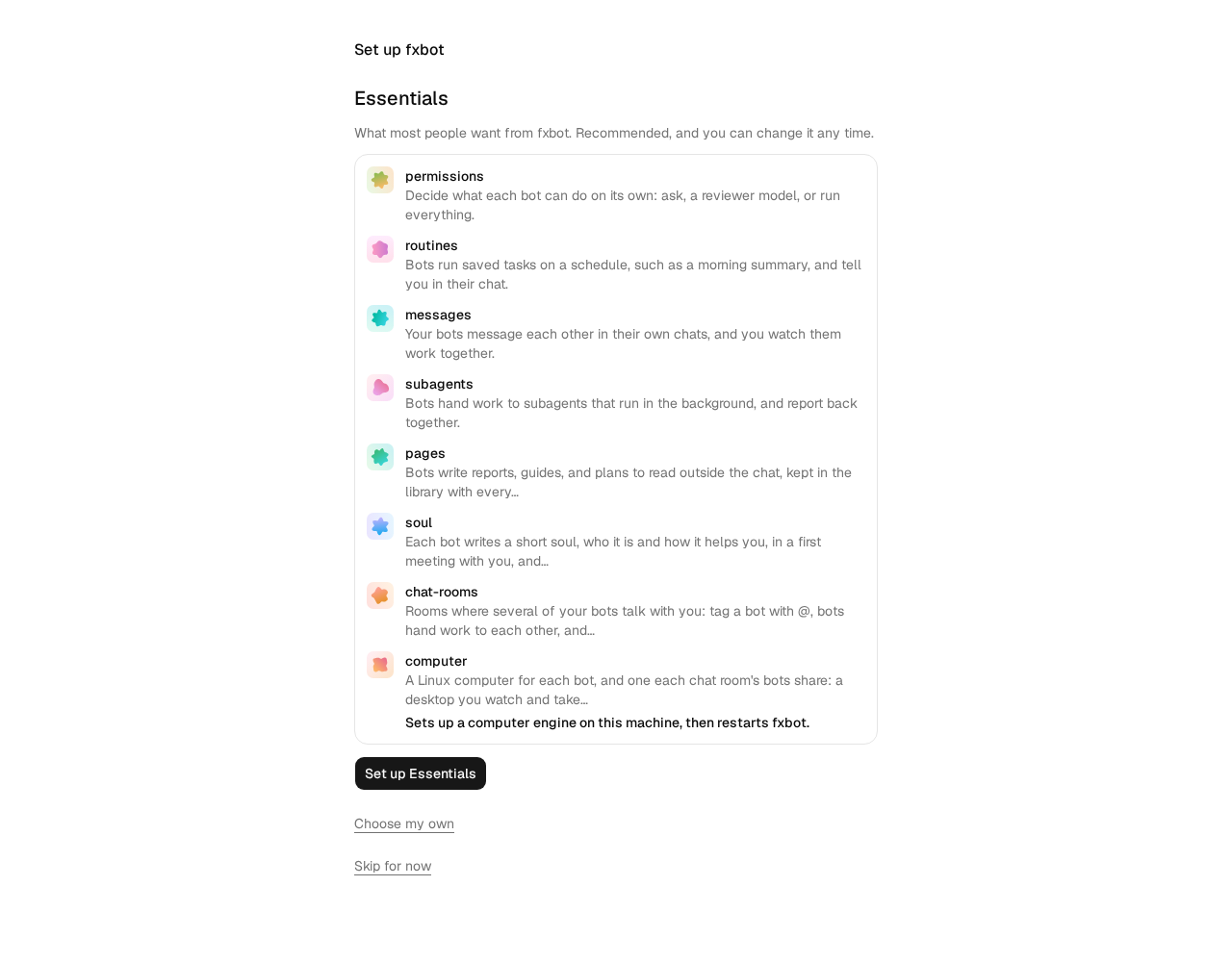
The first time you open it, fxbot shows **Essentials**: the plugins most people want, each with what it gives you. One of them, the computer, sets up a computer engine on this machine, then restarts fxbot, and it says so there. Web pairing, which puts fxbot on your phone, isn’t among them: you’ll add it at the end.
Tap **Set up Essentials**. fxbot adds them one by one, and moves on by itself. To pick your own instead, tap **Choose my own**, where they’re already ticked, and untick what you don’t want. Plugins you leave out are under **Plugins** for later.
### Connect a model
[Section titled “Connect a model”](#connect-a-model)
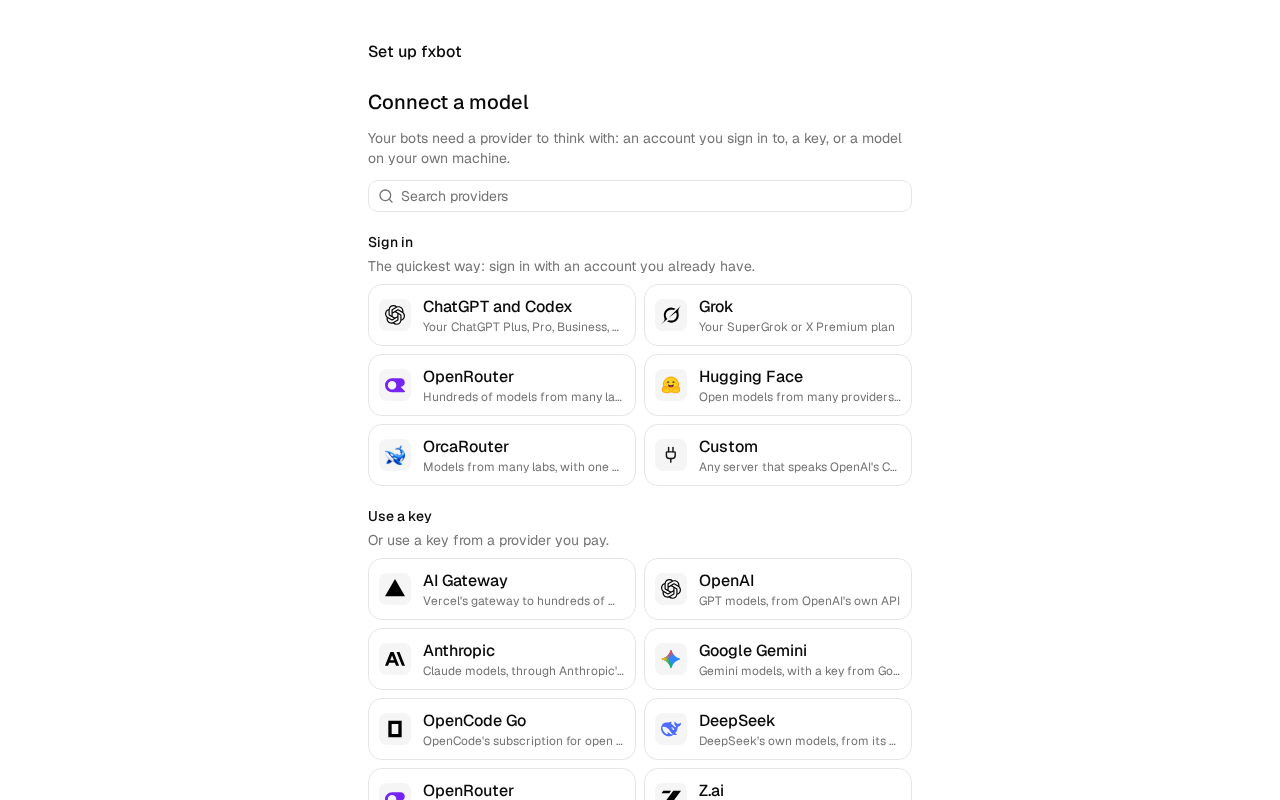
fxbot lists the providers it can connect to, with sign-ins first. Tap **ChatGPT and Codex**, under **Sign in**.
fxbot shows a code, and a QR of its link. Open the link, or scan the QR with your phone, sign in to ChatGPT, and enter the code. The page moves on by itself once you have.
With a key instead, tap the provider under **Use a key**, such as **OpenAI** or **OpenRouter**. Its card links to the page where its keys are made. Paste the key, and tap **Add**. fxbot checks the key with the provider before it keeps it.
Then pick the model your bots use, and tap **Continue**.
### Make a bot
[Section titled “Make a bot”](#make-a-bot)
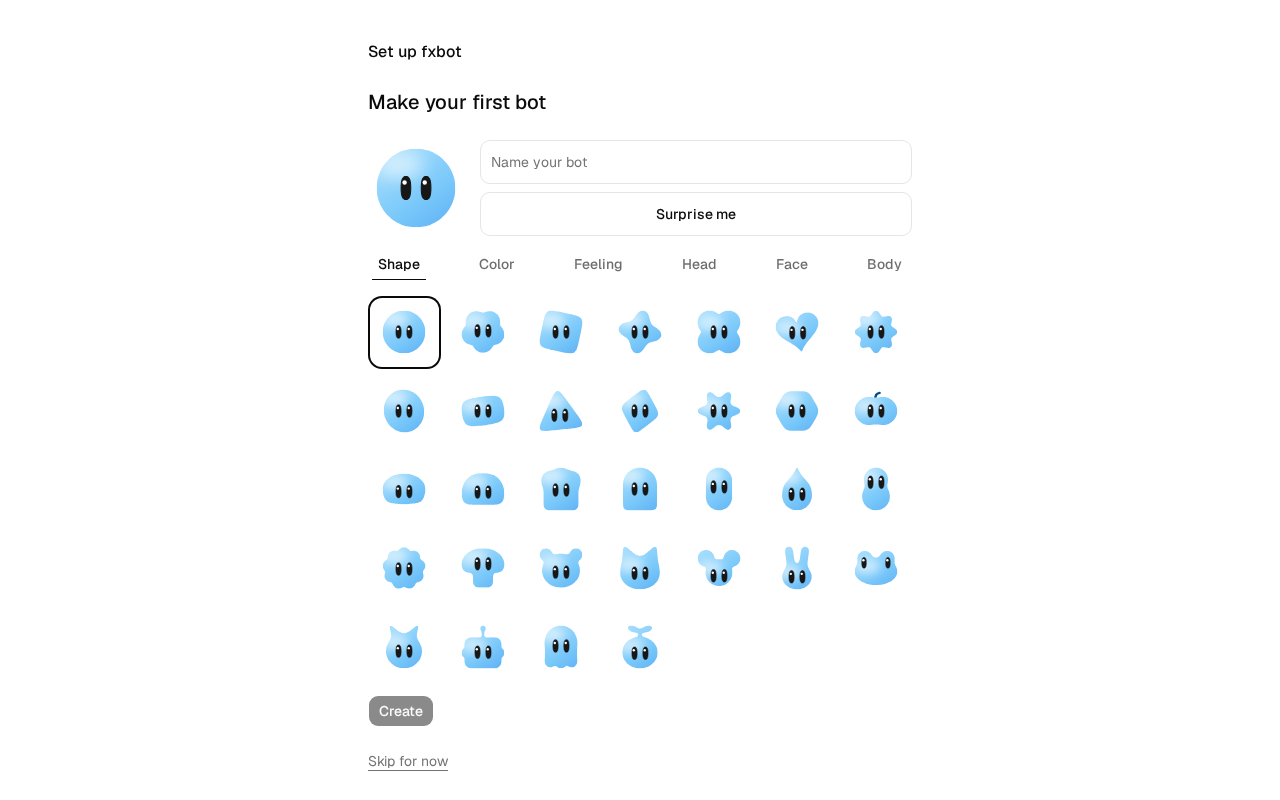
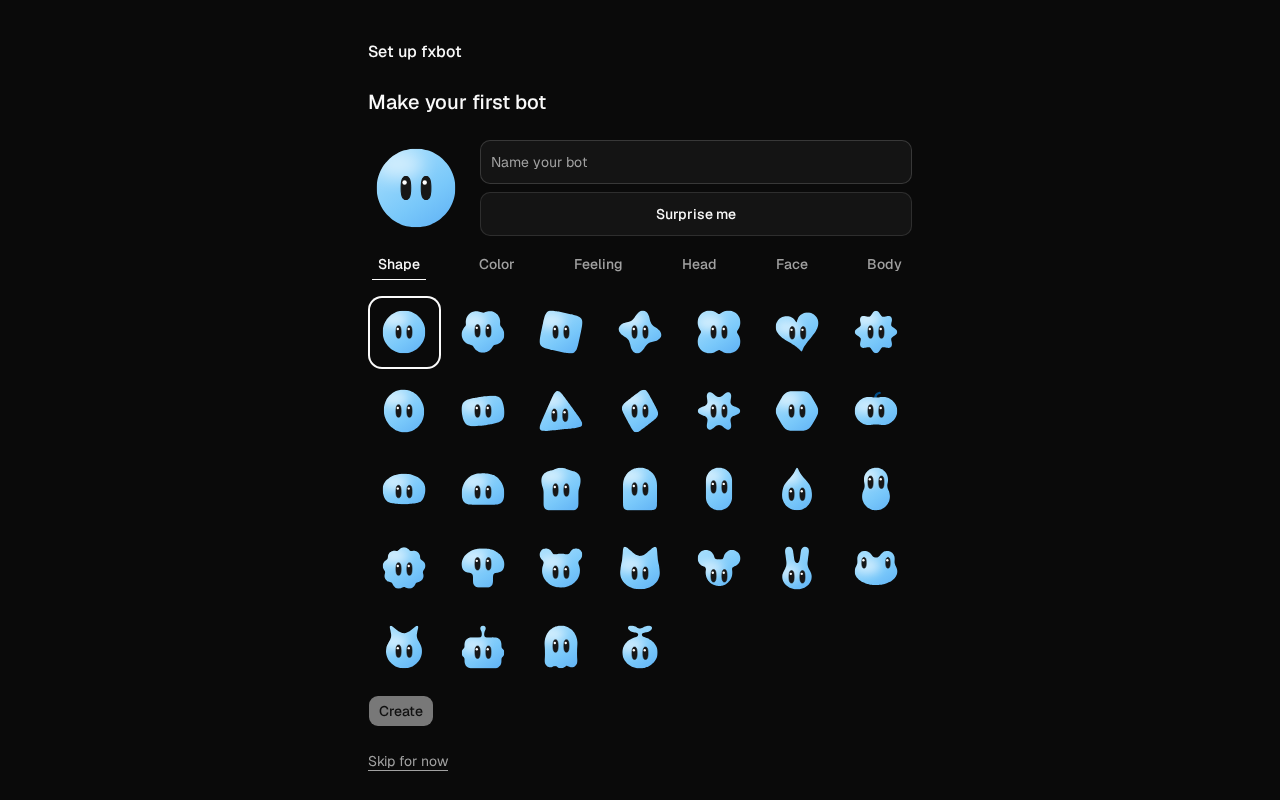
Name the bot `Scout`, pick how it looks, or tap **Surprise me**, and tap **Create**. As you choose, the bot watches.
fxbot says where plugins live for later. Tap **Start chatting**, and Scout’s chat opens.
If you leave partway, fxbot comes back to the same step. **Skip for now** skips the step it’s on, and on the bot step, the last, it ends setup. Everything a step does is still there later: **Plugins** at the foot of the sidebar, **Settings** › **Providers**, and **New bot**.
## Put it on your phone
[Section titled “Put it on your phone”](#put-it-on-your-phone)
Before you say hello, put fxbot on your phone. Web pairing opens your fxbot at [web.fxbot.sh](https://web.fxbot.sh), on your phone, over a connection straight to it, away from home too.
1. In fxbot, open **Plugins**, find **Web pairing**, and add it.
2. On your phone, open web.fxbot.sh and install it:
* **iPhone:** in Safari, tap **Share**, then **Add to Home Screen**. Open fxbot from the Home Screen.
* **Android:** in Chrome, tap **Install app** in its menu, and open the app.
3. In fxbot, open **Settings** › **Web pairing**, and choose **Pair a device**. It shows a code and a QR code.
4. On your phone, in the app, choose **Pair a device**, and type the code. On Android, **Scan the QR code** scans it instead.
5. Both screens show six digits. Check they’re the same, then choose **Approve** in fxbot.
The phone says **Paired**. Tap **Open**: your fxbot fills the screen, with your bots, plugins, and settings. Open Scout’s chat.
To check it’ll connect away from home, see **Settings** › **Web pairing** › **Reachability**. A network that won’t connect directly has [other ways](/docs/how-to/when-a-device-cant-connect/).
## Chat
[Section titled “Chat”](#chat)
On your phone, send `Hello! What can you do?`. The reply streams in as it is written, and the same chat on the machine shows it too.
Now close the app and open it again. The chat is still there, because it lives on your fxbot, not in the app. A reply still being written when you leave carries on without you.
## Give it instructions
[Section titled “Give it instructions”](#give-it-instructions)
Open the bot panel with the button at the top right of the chat, then **Edit**. Under **Instructions**, write `Answer in one short paragraph.` and tap **Save**. Ask Scout something else, and notice the shorter reply.
## What you have now
[Section titled “What you have now”](#what-you-have-now)
A release of fxbot, on your machine and paired with your phone, with a provider and a bot that keeps its chat. From here:
* [Put fxbot on your computer too](/docs/how-to/reach-it-from-your-computer/), as an app of its own.
* [Add a skill](/docs/how-to/add-a-skill/) to give your bots instructions for a kind of task.
* [Add an MCP server](/docs/how-to/add-an-mcp-server/) to give your bots tools.
* [Pair another device](/docs/how-to/pair-another-device/), so a phone that loses its pairing can pair again from anywhere, or [reach it another way](/docs/how-to/reach-it/), such as Tailscale.
* Read about [bots, chats, memories, and the library](/docs/explanation/bots-and-chats/), and the [security model](/docs/explanation/security/).
# Set up with your AI agent
> Give your AI agent one line, and it sets fxbot up on your machine. Or give it all the docs as plain text.
Give your AI agent one line, and it sets fxbot up on your machine. Or give it all the docs as plain text.
## Set up fxbot
[Section titled “Set up fxbot”](#set-up-fxbot)
On the machine you want fxbot on, tell your agent:
```text
Set up fxbot on this computer for me: follow https://fxbot.sh/agent-setup.txt
```
It checks the machine, asks before it installs anything, and leaves your keys and sign-ins to you. When it’s done, carry on from [Set up fxbot](/docs/tutorials/first-fxbot/#set-up-fxbot), which then [puts fxbot on your phone](/docs/tutorials/first-fxbot/#put-it-on-your-phone).
## Give it the docs
[Section titled “Give it the docs”](#give-it-the-docs)
**Copy all docs**, at the top of each page on a computer, copies them all, to paste into a chat. Or point your agent at the plain text:
| File | What’s in it |
| ----------------------------------- | ---------------------------------------- |
| [agent-setup.txt](/agent-setup.txt) | The steps for an agent to install fxbot |
| [llms.txt](/llms.txt) | A short index of the docs, to start from |
| [llms-full.txt](/llms-full.txt) | All the docs in one file, about 400 KB |
Every page has a Markdown twin too, at its address with `.md` in place of the last slash, such as [/docs/how-to/update.md](/docs/how-to/update.md). **Copy Markdown**, at the top of each page, copies it.
# fxbot SDK
> @fxbot/sdk is the agent system that fxbot is built on, for building bot applications of your own: a chat in a terminal, a bot on a messaging service, a page of your own design, or a backend that gives your product bots that remember. fxbot's own server and page are one app built on it.
`@fxbot/sdk` is the agent system that fxbot is built on, for building bot applications of your own: a chat in a terminal, a bot on a messaging service, a page of your own design, or a backend that gives your product bots that remember. fxbot’s own server and page are one app built on it.
New to it? Start with the tutorial, [Build a terminal chat](/sdk/tutorials/terminal-chat/). The SDK’s pages are in four parts, each for a different need.
## What it gives your app
[Section titled “What it gives your app”](#what-it-gives-your-app)
* **Bots with lasting chats.** Each bot is a profile with a name, instructions, a provider, and a model, and one durable chat that survives restarts. A turn runs on [libfx](https://fx.sh/docs/lib), the agent from fx.
* **Providers.** About 40, from a list fxbot.sh keeps up to date: accounts signed in by device code or a way back, such as ChatGPT, Grok, and OpenRouter, keys for gateways, labs, and clouds, and local model servers such as Ollama and LM Studio.
* **Replies as they’re written.** Each chat is a stream of lines: text, thinking, and tool calls, in the order they happen, which a small function folds into turns.
* **Tools.** Every bot searches its own past chats, keeps [memories](/sdk/how-to/memories/), and reads and saves files in the library. Remote MCP servers and skills add more.
* **Plugins.** Code that changes fxbot itself, with hooks into each turn and tool call, tools, routes, tables, settings, and screens of its own. See [Write a plugin](/sdk/how-to/write-a-plugin/).
* **Records in Postgres.** Bots, chats, files, memories, and settings live in Postgres, with every key and token sealed under a key your app holds. The database moves forward through numbered migrations when your app starts.
## Two entries
[Section titled “Two entries”](#two-entries)
| Entry | Runs in | What it is |
| ------------------- | ------------------------------------ | ----------------------------------------------------------------------------------------------------------------------------------------------------- |
| `@fxbot/sdk` | Your backend, on Node 22.18 or newer | `createFxbot()`: the bots, their chats, providers, tools, and records, over your Postgres. It holds the key that seals secrets. |
| `@fxbot/sdk/client` | A page or a script | A typed client for an fxbot server’s HTTP API, with the stream reader and the function that folds stream lines into turns. It carries no credentials. |
## A look
[Section titled “A look”](#a-look)
```ts
import { readFileSync } from "node:fs";
import { createFxbot } from "@fxbot/sdk";
const fxbot = await createFxbot({ databaseUrl: process.env.FXBOT_DATABASE_URL!, secretKey: readFileSync("secret.key", "utf8") });
const provider = await fxbot.providers.add({ kind: "ollama", model: "qwen3:8b" });
const bot = await fxbot.profiles.create({ name: "Scout", provider: provider.id });
await fxbot.send(bot.id, { text: "Hello!", messageId: crypto.randomUUID() });
// The reply streams in on fxbot.stream(bot.id).
```
## What you need
[Section titled “What you need”](#what-you-need)
* Node 22.18 or newer, which runs the SDK’s TypeScript as it is.
* Postgres with the pgvector extension. fxbot’s own compose file runs one, with the local embedder for memory search, under podman or docker.
* A model: a local server such as Ollama, an API key, or an account.
The SDK isn’t on npm yet. It’s TypeScript source in fxbot’s repository, and an app uses it through an npm workspace: see [Use the SDK in a project](/sdk/how-to/set-up/).
## Tutorials
A first app on the SDK, from an empty folder to a chat with your bot.
* [Build a terminal chat](/sdk/tutorials/terminal-chat/)
## How-to guides
Steps for one task in your own app.
* [Use the SDK in a project](/sdk/how-to/set-up/)
* [Stream replies](/sdk/how-to/stream-replies/)
* [Connect providers](/sdk/how-to/providers/)
* [Give bots tools](/sdk/how-to/tools/)
* [Work with memories](/sdk/how-to/memories/)
* [Build a page on the client](/sdk/how-to/web-page/)
* [Write a plugin](/sdk/how-to/write-a-plugin/)
## Reference
The SDK's calls, options, and types, the server's HTTP API, and the plugin API.
* [createFxbot](/sdk/reference/create-fxbot/)
* [The fxbot object](/sdk/reference/server-api/)
* [The client](/sdk/reference/client/)
* [HTTP API](/sdk/reference/http-api/)
* [Plugin API](/sdk/reference/plugin-api/)
## Explanation
How the SDK works under an app, and why.
* [How the SDK works](/sdk/explanation/how-it-works/)
# How the SDK works
> @fxbot/sdk runs bots for your app: their chats, their providers, their tools, and their records. This page is about what happens under the calls, and why the SDK is shaped the way it is. fxbot's own architecture is the same story, told for the app.
`@fxbot/sdk` runs bots for your app: their chats, their providers, their tools, and their records. This page is about what happens under the calls, and why the SDK is shaped the way it is. fxbot’s own [architecture](/docs/explanation/architecture/) is the same story, told for the app.
## Two entries
[Section titled “Two entries”](#two-entries)
The SDK has two entries, for two places.
`@fxbot/sdk` runs in your backend, on Node. `createFxbot()` connects to Postgres, brings the database up to date, starts one agent per provider, and runs any turn that a stopped process left open. It holds the key that seals secrets, and every call that touches a key, a token, or a model goes through it.
`@fxbot/sdk/client` runs in a page or a script. It talks to a server over HTTP, and has the two pieces a chat needs: a stream reader that reconnects, and `applyLine`, which folds stream lines into turns. It imports nothing from the server side, only the shared types, so a page that bundles it gets no server code and no key.
The split is the line between what holds secrets and what shows them. A page can do everything fxbot’s page does, and a key it sends up never comes back to it.
## One agent per provider, one chat per bot
[Section titled “One agent per provider, one chat per bot”](#one-agent-per-provider-one-chat-per-bot)
A turn runs on [libfx](https://fx.sh/docs/lib), the agent from fx. libfx gives an agent one provider, and a session runs only on the agent that started it. So the SDK starts one libfx agent per provider, and the bots on that provider share it.
Each bot has one durable session, its chat. libfx keeps the session in Postgres, step by step, so a turn survives a restart, through [Workflow’s Postgres World](https://workflow-sdk.dev/worlds), in schemas of its own. The SDK keeps everything else in Postgres too: the bots, providers, settings, plugins, the library, memories, and a plain-text copy of every message, which `chat_history` and memory search read.
libfx keeps no model or instructions with a session. So each time the SDK opens a bot’s chat, it passes them: the bot’s model, its instructions, in its own chat the summary from a provider switch or a start-over, its newest memories, the team’s, and the list of its skills, within libfx’s 64 KiB. It also passes the bot’s id, which every tool reads to know whose chat it runs in.
Moving a bot to another provider can’t move its session, so the bot starts a new one there, from a summary of the old. See [Moving a bot to another provider](/docs/explanation/bots-and-chats/#starting-a-chat-over).
## A turn, end to end
[Section titled “A turn, end to end”](#a-turn-end-to-end)
1. `send(id, { text, messageId })` checks the message. On a bot’s first message, it saves a new session id to the bot first, so a restart finds the chat. Files go into the library, and a skill named with `$name` goes along with the text.
2. libfx stores the prompt. The SDK records the message in Postgres, and `send` resolves. The same `messageId` again reaches the same turn and runs nothing new.
3. libfx runs the turn: it asks the model, calls tools as the model asks, and writes each step to the session’s files.
4. `stream(id, cursor)` reads the session’s lines from the cursor on, as libfx writes them, and stays open for more. libfx’s `turn_start` line carries a message only when it was plain text, so the SDK puts back the text and files of a message that sent more.
5. When the turn ends, the SDK records the reply’s text in Postgres, and the start of it as the bot’s `preview`.
6. Each message recorded nudges the embeddings loop, which gives it a vector in the background.
Nothing in the turn waits for the page. A reader that leaves and comes back picks up from its cursor, and a turn left open by a stopped process runs again when `createFxbot` starts, with a `turn_resume` line.
## The tools every bot gets
[Section titled “The tools every bot gets”](#the-tools-every-bot-gets)
Every agent gets the same tools: `chat_history`, the three memory tools, the three library tools, the `skill` tool once there are skills, and the allowed tools of each MCP server, named after it. libfx fixes an agent’s tools when it is made. So a change to them, such as a new MCP server, makes every agent again, one change at a time, after its running turns finish.
Since one agent serves every bot on its provider, a tool can’t know its bot from the agent. It reads the bot’s id from the session, never from what the model asks. A memory tool reaches only that bot’s memories, the library tools only its items, and an MCP tool refuses to run in a bot it wasn’t given to.
## Migrations at start
[Section titled “Migrations at start”](#migrations-at-start)
The schema is a set of numbered SQL files in the SDK, each run once, in order. `createFxbot` runs the ones the database hasn’t seen, in one transaction, under a lock, so two processes starting at once take turns, and a failure keeps none of them.
When the database already holds records, it first backs them up: the database with `pg_dump`, and `dataDir` as a tarball, into a folder of `backupsDir`. It keeps the newest five. A database that a newer release has migrated is refused, since its schema may not suit this one.
This is why updating the SDK is a pull and a restart. The app needs no migration step of its own.
## Sealed secrets
[Section titled “Sealed secrets”](#sealed-secrets)
API keys, sign-in tokens, and an MCP server’s header values and OAuth tokens are sealed in the SDK before they reach Postgres. Postgres holds only the ciphertext. The key that seals them is the `secretKey` your app passes to `createFxbot`, so it stays in your backend, and the database never holds it. `rotateSecrets` seals everything again under a new key.
Opened secrets stay in the process’s memory, for the requests that need them. The SDK’s answers don’t carry them: a listed provider says only whether it holds a key or a sign-in. Device code and OAuth sign-ins run in the backend too, and hand out only a link, a code, and an id to check on. The security model behind this is in [Security model](/docs/explanation/security/).
## Memories and the embeddings loop
[Section titled “Memories and the embeddings loop”](#memories-and-the-embeddings-loop)
Each bot keeps memories in Postgres. The newest go into its instructions on every turn, and `memory_search` finds the rest. Search matches words, with Postgres’s full-text search, and meaning, with vectors in pgvector, and fuses the two lists.
The vectors come from one loop in the SDK. A saved memory, a recorded message, or a new setting nudges it, and it fills in what’s missing: memories first, then messages, newest first, 32 to a request. They come from the local embedder at `embedUrl`, from a provider’s embedding model, or from nowhere, as the settings say. Each model has vectors of its own, and search compares only the current model’s, so a new model never mixes sizes.
The loop never holds up a turn. When the embedder is down, the loop tries again a minute later, and a search that gets no vector within 5 seconds uses words alone. How search ranks: [Search by words and by meaning](/docs/explanation/bots-and-chats/#search-by-words-and-by-meaning).
## TypeScript source in a workspace
[Section titled “TypeScript source in a workspace”](#typescript-source-in-a-workspace)
The SDK is TypeScript, run as it is. Its package points at `.ts` files, and Node 22.18 and newer strips the types as it loads them, so there is no build step. fxbot’s server runs the same way.
Node won’t strip types in a file under `node_modules`. So an app takes the SDK as an npm workspace: `node_modules/@fxbot/sdk` is a link to fxbot’s `packages/sdk`, and Node loads the files from there. Putting the SDK on npm would need a build step, so for now an app takes it from fxbot’s repository, at a release.
## fxbot is one app on it
[Section titled “fxbot is one app on it”](#fxbot-is-one-app-on-it)
fxbot’s own server and page are built on the SDK, as yours would be.
* `packages/server` adds HTTP and nothing more: routes over the SDK’s calls, body limits, the check that a write comes from the page’s own origin, and the page’s files. In a release install, it also asks the machine for updates. A bad input throws an `Error` with a `status`, such as 400 or 404, and the server answers with it.
* `packages/ui`, the page, imports only `@fxbot/sdk/client`.
So whatever fxbot’s page does, a page of yours can do through the same client, against the same server. And whatever fxbot’s server does, a backend of yours can do through the same SDK.
# Work with memories
> A bot keeps what it learns as memories: one fact each, in a sentence that stands on its own, of at most 1,000 characters. Bots save their own during turns. Your app can list them, add its own, change them, and remove them, through fxbot.profiles.memories, and keep the team's, which every bot reads, through fxbot.memories. How bots use them: Memories.
A bot keeps what it learns as memories: one fact each, in a sentence that stands on its own, of at most 1,000 characters. Bots save their own during turns. Your app can list them, add its own, change them, and remove them, through `fxbot.profiles.memories`, and keep the team’s, which every bot reads, through `fxbot.memories`. How bots use them: [Memories](/docs/explanation/bots-and-chats/#memories).
## See what a bot remembers
[Section titled “See what a bot remembers”](#see-what-a-bot-remembers)
```ts
const newest = await fxbot.profiles.memories.list(bot.id);
for (const m of newest) console.log(`mem:${m.id} ${m.savedBy} ${m.updatedAt.slice(0, 10)} ${m.text}`);
```
The list is newest first, 200 by default, and `limit` takes up to 500. Each memory has its `id`, `text`, `savedBy` (`bot` or `owner`), and when it was made and last changed. A memory the bot saved also has `messageId`: the stored message of the turn it was saved in, which `chat_history` reads as `msg:`. It isn’t the `messageId` your app sent.
To search, give a `query`. The best matches come first, by words and, with vectors on, by meaning:
```ts
const found = await fxbot.profiles.memories.list(bot.id, { query: "coffee or tea" });
```
## Add, change, or remove one
[Section titled “Add, change, or remove one”](#add-change-or-remove-one)
```ts
const memory = await fxbot.profiles.memories.add(bot.id, "The owner drinks tea, not coffee.");
await fxbot.profiles.memories.update(bot.id, memory.id, "The owner drinks green tea, not coffee.");
await fxbot.profiles.memories.remove(bot.id, memory.id);
```
* Adding text the bot already has, in other case or spacing, answers with the memory already there.
* A change that says what another memory says merges the two: that other memory stays, and comes back.
* An id works as `12` or as `mem:12`.
* The bot sees the change on its next turn. Its newest memories are in its instructions on every turn, and `memory_search` finds the rest.
Text that is empty or over 1,000 characters fails with status 400, and a memory the bot doesn’t have with 404.
## Keep team memories
[Section titled “Keep team memories”](#keep-team-memories)
Team memories are notes every bot reads, after its own, such as who the owner is, or what the household is. Since 0.10.0, `fxbot.memories` keeps them, with the same calls and checks as a bot’s:
```ts
const cats = await fxbot.memories.add("The household has two cats, Miso and Tofu.");
const team = await fxbot.memories.list(); // newest first; { query } searches
await fxbot.memories.update(cats.id, "The household has two cats: Miso and Tofu.");
await fxbot.memories.remove(cats.id);
```
* **Each has `team: true`,** and `savedByBot`: the bot that saved it, when one did, or null for one you added or one whose bot is deleted.
* **A bot saves one** with `memory_save` and `team: true`, when the owner asks it to remember something for every bot.
* **One of a bot’s own becomes the team’s** with `fxbot.profiles.memories.share(bot.id, memory.id)`. It leaves the bot’s list. If the team already says the same, the bot’s copy goes, and the team’s comes back.
* **The same text** can be both a bot’s own and the team’s. A duplicate is the same text in the same set.
## Watch a bot save its own
[Section titled “Watch a bot save its own”](#watch-a-bot-save-its-own)
During a turn, a bot calls `memory_save`, `memory_search`, and `memory_forget`. They show on the chat’s stream as tool calls, with what the bot passed in `input`, such as the `text` that `memory_save` saves:
```ts
if (line.type === "tool_start" && line.name?.startsWith("memory_")) console.log(line.name, line.input);
```
Reading the stream: [Stream replies](/sdk/how-to/stream-replies/).
## Choose where vectors come from
[Section titled “Choose where vectors come from”](#choose-where-vectors-come-from)
Search by meaning needs vectors from an embedding model. Pick where they come from in the settings:
```ts
await fxbot.settings.update({ embedder: "local" }); // the default: the embedder at embedUrl
await fxbot.settings.update({ embedder: "remote", embeddingProvider: openai.id, embeddingModel: "text-embedding-3-small" });
await fxbot.settings.update({ embedder: "off" }); // words only
```
* `local` uses the embedder you gave `createFxbot` as `embedUrl`, such as the one that fxbot’s compose file runs.
* `remote` uses a provider’s embedding model. The provider must serve embeddings: OpenAI, OpenRouter, AI Gateway, a Vercel account, Ollama, LM Studio, or another OpenAI-style server. The SDK embeds a test string first. If that fails, `update` fails with status 400, and the old setting stays.
* `messageVectors` is how many characters of each chat message get a vector, 8,000 by default. `0` gives vectors to memories only.
A new model means new vectors for everything. They fill in behind your app, memories first, then messages, newest first. Search keeps working meanwhile, with the vectors the model has made, and with words.
## Check how far vectors have got
[Section titled “Check how far vectors have got”](#check-how-far-vectors-have-got)
```ts
const status = await fxbot.settings.embedding();
console.log(`${status.model ?? "Off"}: ${status.memoriesWithVectors} of ${status.memories} memories, ${status.withVectors} of ${status.messages} messages`);
if (status.error) console.error(status.error);
```
`model` is null when vectors are off, or when the local embedder isn’t answering. `error` is the last thing that went wrong, until vectors fill in again.
## From a page
[Section titled “From a page”](#from-a-page)
The client has the same calls over fxbot’s HTTP API: `client.profiles.memories.list(id, query)`, `add`, `update`, `remove`, and `share`, `client.memories.list(query)`, `add`, `update`, and `remove` for the team’s, then `client.settings.update(...)` and `client.settings.embedding()`. See [Build a page on the client](/sdk/how-to/web-page/).
## If it doesn’t work
[Section titled “If it doesn’t work”](#if-it-doesnt-work)
* **The status says this fxbot has no local embedder.** `createFxbot` got no `embedUrl`. Pass it, or pick `remote` or `off`.
* **The status says the local embedder isn’t answering yet.** On its first start, it downloads its model, 310 MB. Until it answers, search uses words alone, and the vectors wait.
* **`update` says the embedding model didn’t answer.** The test string failed. Check the model’s id, and that the provider serves it. Ollama must have pulled it first, as with `ollama pull nomic-embed-text`.
* **`update` says that provider serves no embeddings.** ChatGPT and Grok plans, and OpenCode keys, serve none. Pick another provider.
* **`update` asks for a provider and an embedding model.** `remote` needs both.
# Connect providers
> A provider is where a bot's model runs. Your backend adds one with fxbot.providers, or with fxbot.signIns for an account. Every provider, and what fxbot reads from it, is in Providers.
A provider is where a bot’s model runs. Your backend adds one with `fxbot.providers`, or with `fxbot.signIns` for an account. Each is an entry in fxbot’s list of providers, and its `kind` is the entry’s id. Every provider, and what fxbot reads from it, is in [Providers](/docs/reference/providers/).
To see what there is to add, as a page would show it, ask for the list:
```ts
const { providers, more } = await fxbot.providers.catalog();
// providers: entries with their group, fields, key page, and steps; more: models.dev's other hosts, for search
```
## A server on your network
[Section titled “A server on your network”](#a-server-on-your-network)
For `ollama`, `lmstudio`, `llamacpp`, `vllm`, `litellm`, and `custom`, which is any server with an OpenAI-style Chat Completions API.
```ts
const local = await fxbot.providers.add({ kind: "ollama", model: "qwen3:8b" });
```
* Ollama and LM Studio default to their usual address on this machine. Give `baseUrl` for another, such as `http://192.168.1.20:11434/v1`. A `custom` server needs one.
* An address must use `https`, or `http` on localhost.
* `apiKey` is for a server that wants a key. Ollama and LM Studio take none.
* `modelIds` are model ids for a `custom` server that lists none.
* `contextWindow` overrides the context window the server reports, for every model it serves.
The server must be running: `add` asks it for its models first.
## An API key
[Section titled “An API key”](#an-api-key)
For every entry that takes a key, such as `openai`, `groq`, `deepseek`, or `gateway`, and for models.dev’s hosts in `more`, by their id.
```ts
const openai = await fxbot.providers.add({ kind: "openai", apiKey: process.env.OPENAI_API_KEY!, model: "gpt-6.1-sol" });
```
An entry with fields takes them in `fields`, which fill its address:
```ts
const bedrock = await fxbot.providers.add({ kind: "bedrock", apiKey: process.env.AWS_BEARER_TOKEN_BEDROCK!, fields: { region: "us-west-2" } });
const azure = await fxbot.providers.add({ kind: "azure", apiKey: azureKey, fields: { resource: "my-resource" }, modelIds: ["my-deployment"] });
```
Vertex AI takes a service account’s JSON key, as text, in place of a key:
```ts
const vertex = await fxbot.providers.add({ kind: "vertex", serviceAccount: readFileSync("service-account.json", "utf8") });
```
`add` checks the key with the provider, and refuses one the provider rejects. Then the SDK seals the key in Postgres. A listed provider says only `hasKey: true`, never the key.
To change a key, update it. It’s checked again:
```ts
await fxbot.providers.update(openai.id, { apiKey: newKey });
```
## An account, with a sign-in
[Section titled “An account, with a sign-in”](#an-account-with-a-sign-in)
For `chatgpt`, `grok`, `vercel`, `huggingface`, and `orcarouter` by device code, and `openrouter`, which shows a code to paste, or comes back to your page. The person signs in on any device, and the SDK claims the tokens or the key on your backend.
1. Start the sign-in, and show its link and code:
```ts
const signIn = await fxbot.signIns.start({ kind: "chatgpt" });
console.log(`Open ${signIn.verificationUrl} and enter ${signIn.userCode}`);
```
OpenRouter’s `way` is `paste` unless you pass the page’s own HTTPS or localhost origin, when it’s `redirect`. Send the person to `signIn.url`, then pass the code they paste to `signIns.code(signIn.id, code)`, or route `/api/sign-ins//callback` to `signIns.callback(id, query)`.
2. Ask how it’s going until it’s done. A finished sign-in names the new provider:
```ts
import { setTimeout as sleep } from "node:timers/promises";
let provider: string | undefined;
while (!provider) {
await sleep(2000);
const status = fxbot.signIns.get(signIn.id);
if (status.status === "failed") throw new Error(status.error);
provider = status.provider;
}
```
3. For a Vercel account with more than one team, pick the team to bill:
```ts
const teams = await fxbot.providers.teams(provider);
await fxbot.providers.update(provider, { teamId: teams[0].id });
```
One sign-in runs at a time: a new one replaces one still waiting. `signIns.cancel(id)` stops one. To sign in again to a provider you have, as after a failed refresh, pass its id: `signIns.start({ kind: "chatgpt", provider: id })`.
A Vercel account needs a Vercel OAuth app that may use device codes, and Hugging Face fxbot’s Hugging Face app. The list of providers names Hugging Face’s. Vercel doesn’t let fxbot’s app use device codes yet, so its sign-in is off. Or pass your own apps’ ids to `createFxbot` as `vercelClientId` and `hfClientId`.
## Then: models and bots
[Section titled “Then: models and bots”](#then-models-and-bots)
1. List the provider’s models, and pick its default model:
```ts
const models = await fxbot.providers.models(openai.id); // ids, with a context window, tool use, and images when known
await fxbot.providers.update(openai.id, { model: "gpt-6.1-sol" });
```
2. Make it the default provider, so new bots start on it:
```ts
await fxbot.settings.update({ defaultProvider: openai.id });
const bot = await fxbot.profiles.create({ name: "Scout" });
```
Or give a bot its provider, and a model of its own, when you make it: `profiles.create({ name, provider, model })`. A bot with no model follows its provider’s default.
3. To move a bot to another provider, update it:
```ts
await fxbot.profiles.update(bot.id, { provider: local.id, model: "qwen3:8b" });
```
A bot with a chat starts a new one there, from a summary of the old one. See [Moving a bot to another provider](/docs/explanation/bots-and-chats/#starting-a-chat-over).
`providers.remove(id)` removes a provider that no bot uses.
## From a page
[Section titled “From a page”](#from-a-page)
The client has the same calls over fxbot’s HTTP API: `client.providers.catalog()`, `client.providers.add(...)`, `client.signIns.start(kind)`, `client.signIns.get(id)`, and `client.signIns.code(id, code)`. A key goes up to the server once and never comes back. See [Build a page on the client](/sdk/how-to/web-page/).
## If it doesn’t work
[Section titled “If it doesn’t work”](#if-it-doesnt-work)
* **`add` says the provider rejected this key.** It answered 401 or 403, or a status its entry names, such as xAI’s 400. Check the key, and that it’s for that provider and its region.
* **`add` can’t reach a server on your network.** Start the server first, and check `baseUrl`. Ollama’s ends in `/v1`.
* **`signIns.start` asks for `FXBOT_VERCEL_CLIENT_ID` or `FXBOT_HF_CLIENT_ID`.** Pass `vercelClientId` or `hfClientId` to `createFxbot`.
* **A ChatGPT sign-in fails.** The account or workspace must allow device code sign-in. The error says how to turn it on.
* **`send` says there’s no model.** Give the provider a default model, as in step 1, or give the bot one.
* **`send` says the bot has no provider.** Set a default provider before you make bots, or give each bot one.
* **`providers.remove` says bots use the provider.** Move them to another provider first.
# Use the SDK in a project
> Add @fxbot/sdk to a Node app of your own, with Postgres and the local embedder beside it. The SDK isn't on npm yet. It's TypeScript source in fxbot's repository, and your app takes it from there through an npm workspace.
Add `@fxbot/sdk` to a Node app of your own, with Postgres and the local embedder beside it. The SDK isn’t on npm yet. It’s TypeScript source in fxbot’s repository, and your app takes it from there through an npm workspace.
You need Node 22.18 or newer, git, and podman or docker.
1. Make the project’s folder, and clone fxbot inside it:
```sh
mkdir my-bot && cd my-bot
git clone --depth 1 https://github.com/iammrduncan/fxbot
```
`main` holds releases only, so this is the newest release. To pin one, add `--branch v0.3.0`. A git submodule works the same way: `git submodule add https://github.com/iammrduncan/fxbot`.
2. Write `package.json`, with the SDK’s folder as a workspace:
```json
{
"name": "my-bot",
"private": true,
"type": "module",
"workspaces": ["fxbot/packages/sdk"],
"dependencies": { "@fxbot/sdk": "*" }
}
```
Node runs TypeScript as it is, but not from inside `node_modules`. With the workspace, `node_modules/@fxbot/sdk` is a link to `fxbot/packages/sdk`, and Node loads the SDK from there.
3. Install:
```sh
npm install
```
This installs the SDK’s packages, with libfx’s native addon for your machine’s CPU.
4. Make the key that seals secrets, and a database password, and write them to `.env`:
```sh
openssl rand -base64 32 > secret.key && chmod 400 secret.key
pw=$(openssl rand -hex 16)
printf '%s\n' "FXBOT_DB_PASSWORD=$pw" "FXBOT_DATABASE_URL=postgres://fxbot:$pw@127.0.0.1:5433/fxbot_dev" FXBOT_EMBED_URL=http://127.0.0.1:8081/v1 FXBOT_SECRET_KEY_FILE=secret.key > .env
```
The SDK seals every API key and token it stores with `secret.key`. Keep the file for as long as you keep the database: without it, they can’t be opened again.
5. Start Postgres, with pgvector, on 127.0.0.1:5433, and the local embedder for memory search on 127.0.0.1:8081. fxbot’s own compose file runs both:
```sh
podman compose -f fxbot/deploy/compose.dev.yaml --env-file .env up -d # or docker compose
```
The embedder downloads its model, 310 MB, on its first start. Until it answers, memory search uses words alone.
The compose project is called `fxbot-dev`, the same as a checkout of fxbot’s. If one already runs on this machine, give yours a name and ports of its own in `.env`: `COMPOSE_PROJECT_NAME=my-bot`, then `FXBOT_DB_PORT` and `FXBOT_EMBED_PORT`, with the same ports in `FXBOT_DATABASE_URL` and `FXBOT_EMBED_URL`.
6. Write `bot.ts`:
```ts
import { readFileSync } from "node:fs";
import { createFxbot } from "@fxbot/sdk";
const fxbot = await createFxbot({
databaseUrl: process.env.FXBOT_DATABASE_URL!,
secretKey: readFileSync(process.env.FXBOT_SECRET_KEY_FILE!, "utf8"),
embedUrl: process.env.FXBOT_EMBED_URL,
syncRegistry: false,
});
console.log(await fxbot.profiles.list());
await fxbot.close();
```
`syncRegistry: false` skips the copy of GitHub’s MCP registry and the read of fxbot’s lists when the app starts. An app that doesn’t search for MCP servers doesn’t need them. Every option is in [createFxbot](/sdk/reference/create-fxbot/).
7. Run it:
```sh
node --env-file=.env bot.ts
```
On the first start, `createFxbot` brings the empty database up to date and prints `fxbot migrated the database:`, with the migrations it ran. Then the script prints `[]`: there are no bots yet.
The SDK keeps plugins’ files in `data/` and its backups in `backups/`, in the folder the app runs from. Chats are in the database. `dataDir` and `backupsDir` move them. Keep `.env`, `secret.key`, `data/`, `backups/`, and `node_modules/` out of git, and `fxbot/` too unless it’s a submodule.
## Type-check it
[Section titled “Type-check it”](#type-check-it)
An editor or `tsc` needs fxbot’s TypeScript settings. The SDK’s own source needs the DOM library, even on a server.
1. Install TypeScript and Node’s types:
```sh
npm install -D typescript @types/node@22
```
2. Write `tsconfig.json`:
```json
{
"compilerOptions": {
"target": "ES2023",
"lib": ["ES2023", "DOM"],
"module": "ESNext",
"moduleResolution": "bundler",
"customConditions": ["node"],
"types": ["node"],
"strict": true,
"noEmit": true,
"skipLibCheck": true,
"allowImportingTsExtensions": true,
"verbatimModuleSyntax": true,
"erasableSyntaxOnly": true
},
"include": ["*.ts"]
}
```
`include` names your own files. Change it to where your code lives, and leave `fxbot/` out: `tsc` checks the SDK through your imports, and fxbot’s other packages need settings of their own.
3. Check:
```sh
npx tsc
```
## Update the SDK
[Section titled “Update the SDK”](#update-the-sdk)
1. Read the release’s section of the [changelog](/docs/reference/changelog/). A release that adds migrations says so under **Before upgrading**.
2. Pull the new release, or check out its tag, and install again:
```sh
git -C fxbot pull
npm install
```
3. Start your app. `createFxbot` runs the new migrations, after backing up the database and `data/` into `backups/`.
## If it doesn’t work
[Section titled “If it doesn’t work”](#if-it-doesnt-work)
* **`npm install` can’t find `@fxbot/sdk`.** npm looked for it on the registry, where it isn’t. Check that `workspaces` names `fxbot/packages/sdk`, the folder with the SDK’s own `package.json`.
* **Node refuses to strip types in `node_modules`.** The SDK was copied into `node_modules` instead of linked. Use the workspace from step 2, and run `npm install` again.
* **`createFxbot` says memories need pgvector.** The database lacks the extension. Use the database that the compose file runs, which has it.
* **`createFxbot` says it can’t back up before migrating.** The backup runs the machine’s `pg_dump`, which must be Postgres 17’s, such as from `postgresql-client-17`. Nothing was migrated.
* **`createFxbot` says the database has a migration from a newer fxbot.** A newer SDK has run on this database. Update `fxbot/` to that release or newer.
* **`createFxbot` says the secret key must be 32 random bytes in base64.** `FXBOT_SECRET_KEY_FILE` names the wrong file, or the file holds something else.
* **Compose says the port is in use.** Something else has 5433 or 8081. Set `FXBOT_DB_PORT` or `FXBOT_EMBED_PORT` in `.env`, as in step 5.
# Stream replies
> Show a bot's reply while it's written, in a Node app on @fxbot/sdk. fxbot.send() resolves once libfx has stored the message. The reply comes on fxbot.stream(): the bot's chat as NDJSON, one JSON object per line, which applyLine from @fxbot/sdk/client folds into turns.
Show a bot’s reply while it’s written, in a Node app on `@fxbot/sdk`. `fxbot.send()` resolves once libfx has stored the message. The reply comes on `fxbot.stream()`: the bot’s chat as NDJSON, one JSON object per line, which `applyLine` from `@fxbot/sdk/client` folds into turns.
In a page or a script on fxbot’s server, the client’s `stream()` does all of this for you: see [Build a page on the client](/sdk/how-to/web-page/).
## Read a reply
[Section titled “Read a reply”](#read-a-reply)
1. Add a reader that turns the stream’s bytes into lines:
```ts
import type { Fxbot, StreamLine } from "@fxbot/sdk";
// Every line of a bot's chat after `cursor`, parsed, until the loop that reads it stops.
async function* lines(fxbot: Fxbot, botId: string, cursor = 0): AsyncGenerator {
const reader = (await fxbot.stream(botId, cursor)).getReader();
const decoder = new TextDecoder();
let rest = "";
let epoch = 0;
try {
for (;;) {
const { value, done } = await reader.read();
if (done) return;
const parts = (rest + decoder.decode(value, { stream: true })).split("\n");
rest = parts.pop()!;
for (const part of parts) {
if (!part) continue;
const line: StreamLine = JSON.parse(part);
// libfx's rule: hide a line whose epoch is lower than one before it.
if (line.epoch !== undefined && line.epoch < epoch) continue;
epoch = line.epoch ?? epoch;
yield line;
}
}
} finally {
await reader.cancel();
}
}
```
A chunk can end in the middle of a line, so the last piece waits for the next chunk. Leaving the loop that reads the lines cancels the stream.
2. Send a message, with an id you make:
```ts
const messageId = crypto.randomUUID();
await fxbot.send(bot.id, { text: "What's on today?", messageId });
```
An id is 1 to 128 letters, digits, `.`, `_`, or `-`. The same id again reaches the same turn and runs nothing new, so you can send again after a failed request.
3. Read the chat, fold each line into the turns, and print the reply’s text as it comes:
```ts
import { applyLine, type Turn } from "@fxbot/sdk/client";
let cursor = 0;
let turns: Turn[] = [];
for await (const line of lines(fxbot, bot.id, cursor)) {
cursor = line.cursor ?? cursor;
turns = applyLine(turns, line);
if (line.messageId !== messageId) continue;
if (line.type === "text_delta") process.stdout.write(line.delta ?? "");
if (line.type === "turn_end") break;
}
const turn = turns.find((t) => t.messageId === messageId)!;
if (turn.note) console.error(turn.note);
```
The stream replays the chat from the cursor, then stays open for new lines. From 0, it replays the whole chat, so the loop skips lines of other turns. It stops at the `turn_end` of this message.
4. Keep `cursor` for the next message. A stream opened from it starts after the last line you read, so the next reply comes without a replay.
`applyLine` gives one `Turn` per message: its `text`, its `reply` text, its `parts` in order (thinking, text, and tool calls with their input and result), and `done` once its `turn_end` has come. `note` says how a turn ended when it didn’t end normally, such as `Error: …` or `Stopped: max_output_tokens`. All the fields are in [The client](/sdk/reference/client/).
## The lines
[Section titled “The lines”](#the-lines)
Each line has a `type`. A line of a turn has the turn’s `messageId`, and every line has a `cursor`.
| Type | What it carries |
| ----------------- | ------------------------------------------------------------------------------------------------------------------------------------------------------------------- |
| `turn_start` | A turn began. `input` is the message’s text, and `files` the files it sent. |
| `text_delta` | The next piece of the reply, in `delta`. |
| `reasoning_delta` | The next piece of the model’s thinking, in `delta`, when the provider sends it. |
| `tool_start` | A tool call: its `id`, `name`, and `input`, or `inputPreview` for an input over 64 KiB. |
| `tool_end` | The call’s result, by the same `id`: `content`, and `isError` when it failed. |
| `user_message` | A message joined the running turn, whose `messageId` this has. `id` is the message’s own, `text` its words, and `files` and `from` as on `turn_start`. Since 0.6.0. |
| `turn_end` | The turn ended, and `stopReason` says how: `end_turn` normally, another reason such as `max_output_tokens`, or `error`, with the reason in `error`. |
| `turn_resume` | A turn left open by a stopped process runs again. Its reply starts over. |
libfx writes more types, such as `idle`, which has no `messageId`. `applyLine` passes over the lines it doesn’t use.
## Pick up after a restart
[Section titled “Pick up after a restart”](#pick-up-after-a-restart)
When your app starts, `createFxbot` runs again any turn that a stopped process left open. Its lines come with `turn_resume`, and `applyLine` starts its reply over.
Save `cursor` where your app keeps its state. After a restart, or when a stream ends early, open the stream again from that cursor.
## Pass the stream on over HTTP
[Section titled “Pass the stream on over HTTP”](#pass-the-stream-on-over-http)
A server can hand the stream to its own clients as it is. This is what fxbot’s server does at `/api/profiles//stream?cursor=`, which the client’s `stream()` reads:
```ts
import { Readable } from "node:stream";
import { pipeline } from "node:stream/promises";
import type { ReadableStream } from "node:stream/web";
const body = await fxbot.stream(botId, Number(url.searchParams.get("cursor") ?? 0));
res.writeHead(200, { "content-type": "application/x-ndjson", "cache-control": "no-store" }).flushHeaders();
// A closed response cancels the stream.
await pipeline(Readable.fromWeb(body as ReadableStream), res).catch(() => {});
```
## If it doesn’t work
[Section titled “If it doesn’t work”](#if-it-doesnt-work)
* **The stream ends at once, with no lines.** The bot has no chat yet, or its provider is gone. Send the first message before you open the stream.
* **`send` fails with status 400.** The message has no text, its id breaks the rules in step 2, or the bot has no provider or model. The error says which.
* **The script crashes with `CONNECTION_ENDED` right after a reply.** Before 0.4.0, `close()` didn’t wait for the SDK to save a reply that just finished. Update the SDK, or keep the app running between turns and call `close()` when it shuts down.
* **The reply shows twice.** A turn ran again after a restart: its `turn_resume` line starts the reply over. Fold lines with `applyLine` rather than adding up `text_delta`s yourself.
# Give bots tools
> Every bot comes with tools to search its own chats, keep memories, and use the library. Give bots more with plugins, through fxbot.plugins: remote MCP servers, whose tools they call, and skills, which they read. A package can carry both, with code of its own: see Write a plugin.
Every bot comes with tools to search its own chats, keep memories, and use the library. Give bots more with plugins, through `fxbot.plugins`: remote MCP servers, whose tools they call, and skills, which they read. A package can carry both, with code of its own: see [Write a plugin](/sdk/how-to/write-a-plugin/).
Until Settings’ `unvetted` is true, `preview` and `add` take only what fxbot’s own lists name, and fail with 400 for an address, a public registry’s entry, or a skills.sh skill. Turn it on first: `await fxbot.settings.update({ unvetted: true })`.
## The tools every bot has
[Section titled “The tools every bot has”](#the-tools-every-bot-has)
| Tool | What it does |
| ------------------------------------------------ | -------------------------------------------------------------------------------------------- |
| `chat_history` | Searches the bot’s own messages across all its chats, and reads them in full around a match. |
| `memory_save`, `memory_search`, `memory_forget` | Keep the bot’s memories. See [Work with memories](/sdk/how-to/memories/). |
| `library_search`, `library_read`, `library_save` | Find, open, and save files in the library, only those tagged for the bot. |
| `skill` | Reads one of the bot’s skills. Bots have it once you add a skill. |
Each tool finds its bot from the chat it runs in, never from what the model asks.
## Add an MCP server by its address
[Section titled “Add an MCP server by its address”](#add-an-mcp-server-by-its-address)
1. Look at the server first. `preview` connects without credentials, and answers with its name, how it signs in (`none`, `headers`, or `oauth`), its tools when it lists them without a sign-in, and a `hash`:
```ts
import type { McpPreview } from "@fxbot/sdk";
const ref = { url: "https://mcp.example.com/mcp" };
const page = (await fxbot.plugins.preview(ref)) as McpPreview;
console.log(page.name, page.auth, page.tools?.map((t) => t.name));
```
For a server that takes a key, name its header in the ref, such as `{ url, headers: ["Authorization"] }`.
2. Add it with that hash. If the server changed since the preview, `add` fails with status 409: look at it again.
```ts
const server = await fxbot.plugins.add(ref, page.hash);
```
3. Give it what it needs to connect. For a key, set the header’s value:
```ts
await fxbot.plugins.setSecrets(server.id, { headers: { Authorization: `Bearer ${key}` } });
```
Values go in once and are sealed. A listed server says only `signedIn: true`. For OAuth, see [Sign in with OAuth](#sign-in-with-oauth).
4. Allow the tools bots may call. At first, only the server’s read-only tools are allowed. Name every tool to allow, by the server’s own name for it:
```ts
await fxbot.plugins.change(server.id, { allowed: ["search_issues", "create_issue"] });
```
`plugins.list()` shows each server’s `tools`, each with `readOnly`, its `allowed` list, and its `status`, such as `Connected`. A server that signs in lists its tools once it connects.
5. To give the server to some bots only, choose them one by one:
```ts
await fxbot.plugins.change(server.id, { bots: "each" });
await fxbot.plugins.forBot(bot.id, server.id, true);
```
Bots see each tool under the server’s name, such as `linear_create_issue`.
## Add a server from a registry
[Section titled “Add a server from a registry”](#add-a-server-from-a-registry)
Search fxbot’s list of servers and its copy of GitHub’s MCP registry, then add an entry by its name:
```ts
import type { McpSearch } from "@fxbot/sdk";
const { cards } = (await fxbot.plugins.search("linear", {})) as McpSearch;
const ref = { registry: cards[0].name, from: cards[0].from };
const page = (await fxbot.plugins.preview(ref)) as McpPreview;
const server = await fxbot.plugins.add(ref, page.hash);
```
Then carry on from step 3 above. A card’s `from` is `fxbot` for fxbot’s list, `github` for GitHub’s registry, or `official`. `{ everything: true }` adds the official registry’s results, for searches of 3 characters or more.
The copy of GitHub’s registry fills in when `createFxbot` starts and every hour after. An app started with `syncRegistry: false` has nothing to search until a sync has run. It can still add an entry by its name: `{ registry: "" }`.
## Sign in with OAuth
[Section titled “Sign in with OAuth”](#sign-in-with-oauth)
For a server whose `auth` is `oauth`.
1. Start the sign-in, and send the person to its `url`:
```ts
const attempt = await fxbot.oauth.start(server.id, origin);
console.log(`Open ${attempt.url}`);
```
2. Finish it the way its `mode` says:
* `redirect`: the browser comes back to `/api/oauth/callback`. `origin` is your page’s own, and must be HTTPS. Route that path in your server to `fxbot.oauth.callback(url.searchParams)`.
* `paste`: the browser goes to the `localUrl` you gave `createFxbot`, `http://127.0.0.1:8787` by default, at `/callback`. Serve that path with `fxbot.oauth.callback` too. Where nothing serves it, the page fails to load: pass its address, copied from the browser, to `fxbot.oauth.paste(attempt.id, address)`.
3. Ask `fxbot.oauth.get(attempt.id)` until its `status` is `done` or `failed`. A sign-in expires after 10 minutes.
A server that registers no apps itself needs your own OAuth app: register one with it, then pass it with `setSecrets(server.id, { clientId, clientSecret })`.
## Add a skill
[Section titled “Add a skill”](#add-a-skill)
1. Find it in fxbot’s own skills, or on skills.sh for 2 characters or more:
```ts
import type { SkillPreview, SkillSearch } from "@fxbot/sdk";
const { cards } = (await fxbot.plugins.search("frontend", { kind: "skill" })) as SkillSearch;
const ref = { skill: cards[0].id }; // //
```
2. Look at it. `preview` reads the skill from its repository’s current commit:
```ts
const page = (await fxbot.plugins.preview(ref)) as SkillPreview;
if (page.error) throw new Error(page.error);
console.log(page.text); // its SKILL.md
```
3. Add it with the hash:
```ts
const skill = await fxbot.plugins.add(ref, page.hash);
```
Each bot’s instructions now list its skills, and the `skill` tool reads one when a task needs it. To be sure a bot uses a skill, name it in a message: `$name` anywhere, or `/name` at the start, sends the skill along with it:
```ts
await fxbot.send(bot.id, { text: "/frontend-design A page for a bakery", messageId: crypto.randomUUID() });
```
`profiles.skills(bot.id)` lists the names a bot takes. Skills go to all bots, or to chosen ones with `change` and `forBot`, as servers do.
## Keep plugins up to date
[Section titled “Keep plugins up to date”](#keep-plugins-up-to-date)
`plugins.list()` marks a plugin whose source changed. Its `mark.kind` is `update`, with the newer `version`, or `deprecated`, or `removed`. Nothing changes by itself. To move one to its newer version, look at it again from the same source, then update it with that hash:
```ts
for (const addon of await fxbot.plugins.list()) {
if (addon.mark?.kind !== "update") continue;
const ref = addon.kind === "skill" ? { skill: addon.source.skill } : { registry: addon.source!.registry, from: addon.source!.from, allowLocal: addon.allowLocal };
const page = await fxbot.plugins.preview(ref);
await fxbot.plugins.update(addon.id, page.hash);
}
```
The skills’ repositories are checked every hour. `plugins.check()` checks them now.
`change(id, { enabled: false })` turns a plugin off, and `remove(id)` removes it. A change to the tools bots have makes the agents again, after their running turns finish.
## If it doesn’t work
[Section titled “If it doesn’t work”](#if-it-doesnt-work)
* **`add` or `update` fails with status 409.** The server or skill changed since its preview. Look at it again, and use the new hash.
* **`preview` says the address is local.** A server on this machine or a private network needs `allowLocal: true` in the ref. It may then use `http`. Use it only for a server you run.
* **The server’s `status` is `Add its header values`.** Set them with `setSecrets`. Header names must be the ones the ref named.
* **The server’s `status` is `Sign in to use it`.** Run the OAuth sign-in above.
* **A tool call fails, saying the tool is not allowed.** Add it to `allowed` with `change`.
* **The preview has `local: true`, and `add` refuses it.** That entry runs as a program on this machine, not as a remote server, and the SDK can’t add it yet.
* **The MCP search finds nothing.** The registry’s copy hasn’t synced: see [Add a server from a registry](#add-a-server-from-a-registry).
fxbot’s own page does the same in Plugins: [Add an MCP server](/docs/how-to/add-an-mcp-server/) and [Add a skill](/docs/how-to/add-a-skill/).
# Build a page on the client
> Build a web page of your own on @fxbot/sdk/client, against fxbot's server. The client is a typed wrapper for the server's HTTP API, with the stream reader and applyLine. It carries no credentials: keys go to the server once and never come back.
Build a web page of your own on `@fxbot/sdk/client`, against fxbot’s server. The client is a typed wrapper for the server’s HTTP API, with the stream reader and `applyLine`. It carries no credentials: keys go to the server once and never come back.
You need:
* fxbot’s server, running: a release install, which answers on 127.0.0.1:8787, or `npm run server` in a [checkout](/docs/how-to/checkout-beside-release/).
* A project with the SDK as a workspace: steps 1 to 3 of [Use the SDK in a project](/sdk/how-to/set-up/). A page needs no database or key of its own.
The steps use [Vite](https://vite.dev), as fxbot’s own page does. It compiles the client’s TypeScript along with yours.
1. Install Vite:
```sh
npm install -D vite
```
2. Proxy `/api` to fxbot’s server, in `vite.config.ts`:
```ts
import { defineConfig } from "vite";
export default defineConfig({
server: {
proxy: { "/api": { target: "http://127.0.0.1:8787" } },
},
});
```
The server refuses a write whose `Origin` doesn’t match its `Host`, and sends no CORS headers. So the page reaches it through a proxy on the page’s own origin. Use the object form: Vite’s string form, `"/api": "http://127.0.0.1:8787"`, sets `changeOrigin`, which sends the server’s own host, and every write fails.
3. Write `index.html`:
```html
My bot
```
4. Write `main.ts`. It shows the first bot’s chat, and sends what you type:
```ts
import { applyLine, createClient, type Turn } from "@fxbot/sdk/client";
const client = createClient(); // the page's own origin
const log = document.querySelector("#log")!;
const form = document.querySelector("form")!;
const input = form.querySelector("input")!;
const [bot] = await client.profiles.list();
let turns: Turn[] = [];
form.addEventListener("submit", (event) => {
event.preventDefault();
const text = input.value.trim();
input.value = "";
if (text) client.send(bot.id, { text, messageId: crypto.randomUUID() }).catch((error) => alert(error.message));
});
// Replays the chat, then each new line. It reconnects by itself after a drop.
for await (const line of client.stream(bot.id)) {
turns = applyLine(turns, line);
log.textContent = turns.map((t) => `> ${t.text}\n${t.reply}${t.note ? `\n(${t.note})` : ""}`).join("\n\n");
}
```
5. Start it, and open the address Vite prints:
```sh
npx vite
```
The page needs a bot. Make one in fxbot’s own page, or from yours with `client.profiles.create({ name, provider })`.
## What the client does
[Section titled “What the client does”](#what-the-client-does)
* Each call throws an `Error` with the server’s message, or `Cannot reach the server.` when no answer comes.
* `client.stream(id, { cursor, signal, onConnection, onCaughtUp })` replays the chat from `cursor`, 0 by default, then waits for new lines. `onCaughtUp` hears the replay end. After a drop, it asks again from the last cursor every 2 seconds, and `onConnection` hears it go and come back. It hides lines from an older epoch, as libfx asks. Abort `signal` to stop it.
* `send` resolves once the server has stored the message. The reply comes on the stream.
* `client.providers.add({ kind, apiKey })` sends a key once. A listed provider says only `hasKey`.
* `createClient({ onVersion })` hears the server’s version on every answer, so a page can notice a new release.
Every call is in [The client](/sdk/reference/client/), and the routes behind them in [HTTP API](/sdk/reference/http-api/).
## In production
[Section titled “In production”](#in-production)
Build the page:
```sh
npx vite build
```
Then serve `dist/` and `/api` from one origin, with a reverse proxy in front of both. It must pass the `Host` header on as the browser sent it, and pass the stream’s lines on as they come, without buffering. fxbot’s server has no login of its own, and the client sends no credentials, so whoever reaches the page can use all of fxbot through it. Where to put it: see [Reach fxbot from other devices](/docs/how-to/reach-it/).
## If it doesn’t work
[Section titled “If it doesn’t work”](#if-it-doesnt-work)
* **Writes fail with `This request came from another site.`** The proxy changed `Host`, or the page calls the server from another origin. Use the object form in step 2, without `changeOrigin`.
* **Every call says `Cannot reach the server.`** The proxy can’t reach fxbot’s server, or something answered with a page that isn’t JSON. Check that `curl http://127.0.0.1:8787/api/health` answers.
* **A reply shows up all at once, at its end.** A proxy holds the stream back. Turn buffering off for `/api/profiles//stream`.
* **The chat stays empty.** The bot has no chat until its first message. The stream asks again every 2 seconds, and shows it once you send one.
# Write a plugin
> A plugin changes fxbot itself: server code that runs in fxbot's own process, and as much as it needs of page code, tables, settings, skills, and remote MCP servers. This guide writes one in a checkout of fxbot, which loads it from its folder and again each time you change it, then publishes it on GitHub. Every call is in Plugin API.
A plugin changes fxbot itself: server code that runs in fxbot’s own process, and as much as it needs of page code, tables, settings, skills, and remote MCP servers. This guide writes one in a checkout of fxbot, which loads it from its folder and again each time you change it, then publishes it on GitHub. Every call is in [Plugin API](/sdk/reference/plugin-api/).
You need a checkout of fxbot that runs with `npm run dev`: see [Run from a checkout](https://github.com/iammrduncan/fxbot#run-from-a-checkout) in the README.
## 1. Make the plugin
[Section titled “1. Make the plugin”](#1-make-the-plugin)
1. Make its folder:
```sh
mkdir -p my-plugins/hello/fxbot
```
2. Write `my-plugins/hello/plugin.json`:
```json
{
"name": "hello",
"version": "0.1.0",
"description": "Greets people",
"extensions": {
"sh.fxbot": { "server": "./fxbot/server.ts" }
}
}
```
The name is the plugin’s id in fxbot: up to 40 lowercase letters, digits, and dashes. Bots see its tools as `hello_`, its routes are under `/api/plugins/hello/`, and its tables are in the schema `plugin_hello`. fxbot’s own fields go under `sh.fxbot`, so the rest of the file stays the [Agent Plugins](https://github.com/agentplugins/agent-plugins-spec) manifest that other agents read.
3. Write `my-plugins/hello/fxbot/server.ts`:
```ts
import type { PluginApi } from "@fxbot/sdk";
export default function setup(fx: PluginApi) {
let greeted = 0;
// A tool, which bots see as hello_greet.
fx.tool({
name: "greet",
description: "Greet someone by name",
inputSchema: { type: "object", properties: { name: { type: "string" } }, required: ["name"] },
idempotent: true,
execute: (input: { name: string }) => (greeted++, `Hello, ${input.name}!`),
});
// A line in the instructions of every chat it's on for.
fx.on("instructions", (event) => {
event.instructions.push("When someone asks you to greet a person, use hello_greet.");
});
// A route, at /api/plugins/hello/count.
fx.route("GET", "/count", () => Response.json({ greeted }));
}
```
The import is for types only: Node erases it, so the plugin needs nothing installed to run. For an editor’s types, open the folder in a project that has the SDK, as in [Use the SDK in a project](/sdk/how-to/set-up/).
## 2. Load it
[Section titled “2. Load it”](#2-load-it)
1. Name its folder in the checkout’s `.env`, as an absolute path. Separate more than one with `:`.
```sh
FXBOT_PLUGIN_DIRS=/path/to/my-plugins/hello
```
2. Start `npm run dev` again. fxbot adds the plugin on first sight, and the API’s output says `[plugin hello] loaded 0.1.0`. It’s in **Plugins**, under **Installed**.
3. Ask a bot to greet someone. Its reply shows a call of `hello_greet`.
4. Read the count from the route:
```sh
curl http://127.0.0.1:8788/api/plugins/hello/count
```
Change `server.ts`, and fxbot loads the plugin again a moment later. A plugin whose setup throws stays added but off, with the error on its row in **Plugins**, and in its log.
## 3. Add a page
[Section titled “3. Add a page”](#3-add-a-page)
1. Write `fxbot/page.jsx`. It gets React and `@fxbot/app` from the page:
```jsx
import { useEffect, useState } from "react";
import { api, ui } from "@fxbot/app";
function Count() {
const [greeted, setGreeted] = useState(null);
useEffect(() => {
api("/count").then((res) => res.json()).then((body) => setGreeted(body.greeted));
}, []);
return (
Greeted {greeted ?? "…"} times.
);
}
export default function setup(app) {
app.nav({ label: "Hello", path: "/count" });
app.route("/count", Count);
}
```
2. Build it into one CommonJS file that leaves React and `@fxbot/app` out. [rolldown](https://rolldown.rs) comes with the checkout’s packages:
```sh
npx rolldown /path/to/my-plugins/hello/fxbot/page.jsx --format cjs -e react -e react/jsx-runtime -e @fxbot/app --file /path/to/my-plugins/hello/fxbot/page.js
```
Run it in the checkout, where `npx` finds rolldown.
3. Name it in `plugin.json`, beside `server`: `"page": "./fxbot/page.js"`.
4. Reload the page. The sidebar’s footer has an **H** button, which opens `/hello/count`.
The page’s styles hold only the classes the app uses. The app’s components, in `ui`, bring their own looks. For more, name a CSS file in `plugin.json` as `css`.
## 4. Keep data
[Section titled “4. Keep data”](#4-keep-data)
1. Name a folder of migrations in `plugin.json`: `"migrations": "./fxbot/migrations"`.
2. Write `fxbot/migrations/0001_greetings.sql`:
```sql
create table greetings (name text not null, at timestamptz not null default now());
```
3. Use the table with `fx.sql`, which is in the plugin’s own schema:
```ts
execute: async (input: { name: string }) => {
await fx.sql`insert into greetings (name) values (${input.name})`;
return `Hello, ${input.name}!`;
},
```
Each file runs once, in name order, in a transaction. Add a new file for each change, and never change one that has shipped. Removing the plugin drops its schema.
## 5. Take settings
[Section titled “5. Take settings”](#5-take-settings)
1. Declare them in `plugin.json`, under `sh.fxbot`:
```json
"settings": [
{ "name": "greeting", "description": "The word to greet with", "default": "Hello" },
{ "name": "apiKey", "description": "A key for the greeting service", "isSecret": true }
]
```
2. Read them as `fx.settings.greeting`. The object stays up to date, and `fx.on("settings", …)` hears a change.
The owner sets them on the plugin’s tab in **Settings**. A secret one is sealed, and the page never gets it back.
## 6. Need another plugin
[Section titled “6. Need another plugin”](#6-need-another-plugin)
A plugin can build on another. The browser plugin has no code: it gives the computer setup steps, which install a browser on every bot’s computer.
1. Name the plugin you need under `sh.fxbot`’s `needs`, with an object for it. What the object holds is up to that plugin: the computer takes `setup`, a list of shell steps for its image.
```json
"needs": { "computer": { "setup": ["apt-get update && apt-get install -y --no-install-recommends chromium"] } }
```
2. The owner adds the plugin you need first: your plugin’s page says what it needs, and **Add** waits for it. Yours loads after it, and while yours is added, it can’t be removed.
3. The plugin you need reads every plugin’s object with `fx.dependents()`, and hears a change with `fx.on("dependents", …)`.
## 7. Say which fxbot it needs
[Section titled “7. Say which fxbot it needs”](#7-say-which-fxbot-it-needs)
Set `minFxbot` in `plugin.json` to the oldest fxbot your plugin runs on, and raise it when you start using something newer. The [Plugin API](/sdk/reference/plugin-api/#which-fxbot-it-runs-on) says `Since` on what’s new:
```json
{ "extensions": { "sh.fxbot": { "minFxbot": "0.6.0", "server": "./fxbot/server.ts" } } }
```
An owner on an older fxbot can’t add it, or update to it, and is told what it needs. When a later release breaks something your plugin uses, it shows as **Unsupported**, with what to change. Change it, raise `minFxbot` to that release, and push.
## 8. Publish it
[Section titled “8. Publish it”](#8-publish-it)
1. Push the plugin’s folder to a public GitHub repository, at its root or in a folder of it.
2. Anyone can add it from **Plugins**, on **Browse**, under **From GitHub**: `owner/repo`, or `owner/repo/folder`. That’s there once they turn on unvetted plugins in Settings › Plugins, since fxbot doesn’t vet it. fxbot pins it to the commit that its page showed.
3. When you push a change that touches its files, fxbot marks it **Update available** within the hour, and shows the owner what changes before it moves.
A plugin can also carry skills, as `skills//SKILL.md`, and remote MCP servers, in `mcp.json`. To ask for a place in fxbot’s own list, open a pull request that adds it to `packages/sdk/src/plugins-registry.json`.
# The client
> @fxbot/sdk/client is a typed client for an fxbot server's HTTP API, for a page or a script.
`@fxbot/sdk/client` is a typed client for an fxbot server’s [HTTP API](/sdk/reference/http-api/), for a page or a script.
```ts
import { applyLine, createClient, type Turn } from "@fxbot/sdk/client";
const client = createClient({ baseUrl: "http://127.0.0.1:8787" });
let turns: Turn[] = [];
for await (const line of client.stream(botId, { signal })) turns = applyLine(turns, line);
```
It imports nothing from `@fxbot/sdk`’s main entry, so a browser bundle can take it. See [Build a page on the client](/sdk/how-to/web-page/).
## createClient
[Section titled “createClient”](#createclient)
`createClient(options?)` returns a `Client`.
| Option | Type | Default | What it does |
| ----------- | --------------------------- | --------------------------- | ----------------------------------------------------------------------------------------------- |
| `baseUrl` | `string` | `""`, the page’s own origin | The server’s origin, such as `http://127.0.0.1:8787`. A script needs it. |
| `onVersion` | `(version: string) => void` | None | Hears the version in each answer’s `x-fxbot-version` header, so a page can notice a new release |
* Each call asks `/api/...` with `fetch`, sends JSON, and resolves to the JSON answer.
* A call that fails throws an `Error` with the server’s message. When the server can’t be reached, or answers with something that isn’t JSON, such as a proxy’s page, the message is `unreachable`: “Cannot reach the server.” The `Error` carries no status.
* The client holds no keys or tokens. A key goes to the server once, in `providers.add` or `providers.update`, and comes back only as `hasKey`. Header values and OAuth clients go up once, in `plugins.setSecrets`.
* The server refuses a write with 403 when the request’s `Origin` header names another host than its `Host`. A browser sends `Origin`, so a page on another origin gets 403 for every write. Node’s `fetch` sends no `Origin`, so a script’s writes pass. The server sends no CORS headers.
## Calls
[Section titled “Calls”](#calls)
Each call is one route of the [HTTP API](/sdk/reference/http-api/). They mirror [the fxbot object](/sdk/reference/server-api/), which has the rules for each.
### Health and updates
[Section titled “Health and updates”](#health-and-updates)
| Call | Route | Returns |
| ---------------- | ------------------ | ----------------------- |
| `health()` | `GET /api/health` | `{ ok: true, version }` |
| `update.get()` | `GET /api/update` | `UpdateStatus` |
| `update.start()` | `POST /api/update` | `UpdateStatus` |
### Bots
[Section titled “Bots”](#bots)
| Call | Route | Returns |
| ---------------------------------------------- | --------------------------------------------------- | ------------------------------------ |
| `profiles.list()` | `GET /api/profiles` | `Profile[]` |
| `profiles.get(id)` | `GET /api/profiles/` | `Profile` |
| `profiles.create(fields)` | `POST /api/profiles` | `Profile` |
| `profiles.stop(id)` | `POST /api/profiles//stop` | `{ ok: true }` |
| `profiles.update(id, fields)` | `PATCH /api/profiles/` | `Profile` |
| `profiles.order(ids)` | `PUT /api/profiles/order` | `Profile[]` |
| `profiles.remove(id)` | `DELETE /api/profiles/` | `{ ok: true }` |
| `profiles.earlier(id)` | `GET /api/profiles//earlier` | `Turn[]` |
| `profiles.skills(id)` | `GET /api/profiles//skills` | `BotSkill[]` |
| `profiles.memories.list(id, query?)` | `GET /api/profiles//memories?query=` | `Memory[]` |
| `profiles.memories.add(id, text)` | `POST /api/profiles//memories` | `Memory` |
| `profiles.memories.update(id, memoryId, text)` | `PATCH /api/profiles//memories/` | `Memory` |
| `profiles.memories.remove(id, memoryId)` | `DELETE /api/profiles//memories/` | `{ ok: true }` |
| `profiles.memories.share(id, memoryId)` | `POST /api/profiles//memories//share` | `Memory`. Since 0.10.0 |
| `memories.list(query?)` | `GET /api/memories?query=` | `Memory[]`: the team’s. Since 0.10.0 |
| `memories.add(text)` | `POST /api/memories` | `Memory`. Since 0.10.0 |
| `memories.update(memoryId, text)` | `PATCH /api/memories/` | `Memory`. Since 0.10.0 |
| `memories.remove(memoryId)` | `DELETE /api/memories/` | `{ ok: true }`. Since 0.10.0 |
`profiles.memories.list` and `memories.list` take the search as a string. An empty one lists the newest.
### Chat
[Section titled “Chat”](#chat)
| Call | Route | Returns |
| ---------------------- | --------------------------------------- | ---------------------------------------------------------------------------------------------------- |
| `send(id, message)` | `POST /api/profiles//messages` | `{ messageId, sessionId }`, and `joined`, the running turn’s `messageId`, when the message joined it |
| `stream(id, options?)` | `GET /api/profiles//stream?cursor=` | An async generator of `StreamLine` |
`send` resolves once the server has stored the message. The reply arrives on the stream.
### Settings
[Section titled “Settings”](#settings)
| Call | Route | Returns |
| ------------------------- | ----------------------------- | ----------------- |
| `settings.get()` | `GET /api/settings` | `Settings` |
| `settings.update(fields)` | `PATCH /api/settings` | `Settings` |
| `settings.embedding()` | `GET /api/settings/embedding` | `EmbeddingStatus` |
`settings.update` also takes `local`: `cpu`, `gpu`, or `off`. It asks the machine to run its local embedder that way, in an install made by `setup.sh`.
### Providers and sign-ins
[Section titled “Providers and sign-ins”](#providers-and-sign-ins)
| Call | Route | Returns |
| -------------------------------------- | -------------------------------- | --------------- |
| `providers.list()` | `GET /api/providers` | `Provider[]` |
| `providers.add(provider)` | `POST /api/providers` | `Provider` |
| `providers.update(id, fields)` | `PATCH /api/providers/` | `Provider` |
| `providers.remove(id)` | `DELETE /api/providers/` | `{ ok: true }` |
| `providers.models(id)` | `GET /api/providers//models` | `Model[]` |
| `providers.teams(id)` | `GET /api/providers//teams` | `Team[]` |
| `providers.catalog()` | `GET /api/providers/catalog` | `Catalog` |
| `providers.local()` | `GET /api/providers/local` | `LocalServer[]` |
| `signIns.start(kind, provider?, way?)` | `POST /api/sign-ins` | `SignIn` |
| `signIns.get(id)` | `GET /api/sign-ins/` | `SignInStatus` |
| `signIns.code(id, code)` | `POST /api/sign-ins//code` | `SignInStatus` |
| `signIns.cancel(id)` | `DELETE /api/sign-ins/` | `{ ok: true }` |
A sign-in: for a `device` one, show `userCode` and `verificationUrl`; for `redirect`, open `url`, which comes back to the page’s own address; for `paste`, open `url`, and send the code it shows with `signIns.code`. Then call `signIns.get` until the status is `done` or `failed`. `way: "paste"` asks OpenRouter for a code even where it could come back.
### Library
[Section titled “Library”](#library)
| Call | Route | Returns |
| ---------------------------------------------------------- | --------------------------------------------------- | -------------- |
| `library.list({ q?, profileId?, kind?, before?, limit? })` | `GET /api/library?q=&profile=&kind=&before=&limit=` | `LibraryPage` |
| `library.get(id)` | `GET /api/library/` | `LibraryItem` |
| `library.remove(id)` | `DELETE /api/library/` | `{ ok: true }` |
A file itself is read through its item’s `url`, `/api/library//file`.
### Plugins and OAuth
[Section titled “Plugins and OAuth”](#plugins-and-oauth)
| Call | Route | Returns |
| ---------------------------------------------- | -------------------------------------------------- | ---------------------------------------------------------------------------------- |
| `plugins.list()` | `GET /api/plugins` | `Plugin[]` |
| `plugins.search(q, { kind?, everything? })` | `GET /api/plugins/search?q=&kind=&everything=1` | `McpSearch` |
| `plugins.searchSkills(q)` | `GET /api/plugins/search?q=&kind=skill` | `SkillSearch` |
| `plugins.preview(ref)` | `POST /api/plugins/preview` | `SkillPreview` for a skill ref, `PackagePreview` for a repo ref, else `McpPreview` |
| `plugins.add(ref, hash)` | `POST /api/plugins` | `Plugin` |
| `plugins.update(id, hash)` | `POST /api/plugins//update` | `Plugin` |
| `plugins.change(id, fields)` | `PATCH /api/plugins/` | `Plugin` |
| `plugins.remove(id)` | `DELETE /api/plugins/` | `{ ok: true }` |
| `plugins.setSecrets(id, secrets)` | `PUT /api/plugins//secrets` | `Plugin` |
| `plugins.forBot(profileId, pluginId, enabled)` | `PUT /api/profiles//plugins/` | `Plugin` |
| `plugins.readSkill(id, file?)` | `GET /api/plugins//skills?file=` | `string` |
| `plugins.signIn(id)` | `POST /api/plugins//sign-in` | `OAuthAttempt` |
| `plugins.searchPackages(q)` | `GET /api/plugins/search?q=&kind=package` | `PackageSearch` |
| `plugins.configure(id, settings)` | `PUT /api/plugins//settings` | `PackagePlugin` |
| `plugins.log(id)` | `GET /api/plugins//log` | `string[]` |
| `plugins.contents(id)` | `GET /api/plugins//contents` | `PackagePreview` |
| `plugins.pages()` | `GET /api/plugins/pages` | `PluginPage[]` |
| `oauth.get(attemptId)` | `GET /api/oauth/attempts/` | `OAuthStatus` |
| `oauth.paste(attemptId, address)` | `POST /api/oauth/attempts//paste` | `OAuthStatus` |
After `plugins.signIn`, open the attempt’s `url`, then call `oauth.get` until the status is `done` or `failed`. The browser’s `Origin` decides where the sign-in comes back to.
## stream
[Section titled “stream”](#stream)
```ts
stream(id: string, options?: { cursor?: number; session?: string; signal?: AbortSignal; onConnection?: (connected: boolean) => void; onCaughtUp?: () => void }): AsyncGenerator
```
| Option | Default | What it does |
| -------------- | ------- | ---------------------------------------------------------------------------------------------------------------------------- |
| `cursor` | `0` | Where to start. 0 replays the whole chat. |
| `session` | None | The session `cursor` is in. When the chat has moved from it since, the stream is the `moved` line alone. Since 0.5.0. |
| `signal` | None | Stops the stream. The generator then returns. |
| `onConnection` | None | Hears `true` on each connection, and `false` when one drops |
| `onCaughtUp` | None | Hears each connection catch up: every line the chat had when it opened has been yielded, so the lines before were the replay |
* It yields every line of the bot’s chat from `cursor` on, then each new line, until `signal` aborts.
* It keeps the `cursor` of the last line it read. When the connection drops, the server answers with an error, or the stream ends, it waits 2 seconds and asks again from that cursor. The server ends the stream at once for a bot with no chat yet, so the client asks again every 2 seconds until the chat starts.
* It hides a line whose `epoch` is lower than one it has already seen, as libfx’s rule says.
* A `moved` line, when the chat starts over, is the last it yields: a cursor of the old session means nothing in the new one. Read the bot again, and stream its new `sessionId` from 0.
* Each connection’s `x-fxbot-version` header goes to `onVersion`. Its `x-fxbot-end` header, the chat’s newest cursor, says when to call `onCaughtUp`. A server without it is caught up at once.
* A page can hold the replay’s lines and show them together at `onCaughtUp`, so a chat opens at its end instead of scrolling past each turn as it arrives. fxbot’s own page does.
## applyLine
[Section titled “applyLine”](#applyline)
`applyLine(turns, line)` folds one stream line into a list of turns, one per message, and returns a new list. It doesn’t change the list it was given.
| Line | What it changes |
| ------------------------------------------ | ------------------------------------------------------------------------------------------------------------------------------------------------------------------------------------------------------------------------------------------------------------------------------------------------------------ |
| A line without `messageId`, such as `idle` | Nothing |
| `turn_start`, `turn_resume` | Moves the turn to the end of the list and starts it again: an empty `reply` and `parts`, `done: false`, and no `note` or `unsent`. `text` comes from the line’s `input` when it is a string, and `files` from the line’s `files`. A turn that runs again after a crash sends its reply again from the start. |
| `text_delta` | Adds `delta` to `reply`, and to the last part when it is text, or else to a new text part. Separate text parts are joined in `reply` with a blank line. |
| `reasoning_delta` | Adds `delta` to the last part when it is reasoning, or else to a new reasoning part |
| `tool_start` | Adds a tool part with its `id`, `name`, and `input`, or `inputPreview` for a large input |
| `user_message` | Adds a `user` part to the running turn, `{ type: "user", id, text, files?, from? }`, and drops the turn the page made for that message. |
| `tool_end` | Ends the tool part of the same `id`, with `output` from `content` and `error` from `isError`. A tool that started before the replay’s cursor is added here. |
| `turn_end` | Sets `done`. `note` is `Error: ` for an error, or `Stopped: ` when the reason isn’t `end_turn`. A tool still running is marked done. |
| Any other type | Nothing |
A line for a message not in the list adds a turn for it.
## Types
[Section titled “Types”](#types)
```ts
type Turn = {
messageId: string;
text: string; // the message
files?: Upload[];
reply: string; // the reply's text alone
parts?: Part[]; // the reply step by step, in order
done: boolean;
note?: string; // an error, or why it stopped
unsent?: boolean; // for a page: a message the server never took
};
type Part =
| { type: "reasoning"; text: string }
| { type: "text"; text: string }
| { type: "tool"; id: string; name: string; input?: unknown; inputPreview?: string; output?: string; error?: boolean; done: boolean };
```
A turn from `profiles.earlier` has `reply` and no `parts`.
## Stream lines
[Section titled “Stream lines”](#stream-lines)
`StreamLine` is one line of a bot’s NDJSON stream, as far as fxbot reads it. libfx writes more types and fields.
| Field | Type | What it is |
| -------------- | --------------------- | ------------------------------------------------------------------ |
| `type` | `string` | The line’s type |
| `messageId` | `string` | The turn it belongs to |
| `input` | `unknown` | The message on `turn_start`, or a tool’s arguments on `tool_start` |
| `text` | `string` | A message’s words, on `user_message` |
| `files` | `Upload[]` | A message’s files, on `turn_start` |
| `delta` | `string` | New text, on `text_delta` and `reasoning_delta` |
| `id` | `string` | A tool call’s id, which pairs `tool_start` with `tool_end` |
| `name` | `string` | A tool’s name |
| `inputPreview` | `string` | A preview of a tool’s input, in place of a large `input` |
| `content` | `string` | A tool’s result, on `tool_end` |
| `isError` | `boolean` | Whether the tool failed, on `tool_end` |
| `stopReason` | `string` | Why the turn ended, on `turn_end`, such as `end_turn` |
| `error` | `{ message: string }` | Why the turn failed, on `turn_end` |
| `cursor` | `number` | Where to start again to get the lines after this one |
| `epoch` | `number` | The lease epoch of the line’s writer |
| `sessionId` | `string` | On `moved`: the session the chat started over in |
The types `applyLine` reads:
| Type | When |
| ----------------- | --------------------------------------------- |
| `turn_start` | A turn starts |
| `turn_resume` | A turn a stopped process left open runs again |
| `text_delta` | More of the reply’s text |
| `reasoning_delta` | More of the model’s reasoning |
| `tool_start` | A tool call starts |
| `tool_end` | A tool call ends |
| `turn_end` | A turn ends |
libfx writes other types too, such as `turn_yield` and `idle`. `applyLine` passes over them, and over `moved`, fxbot’s own last line of a chat that started over, by a provider switch or a plugin’s `startOver`, with the new `sessionId`. Since 0.5.0.
## Exports
[Section titled “Exports”](#exports)
| Export | What it is |
| ------------------------------------------------------------------------------------------------------------------------------------------------------------------ | ----------------------------------------------------------------------------------------------------------------------------------------------------------------------------------------------------------------------------------------------------------------------------------------------------------------------------------- |
| `createClient` | Makes a client |
| `applyLine` | Folds a stream line into a list of turns |
| `unreachable` | `"Cannot reach the server."`, the message of a call that got no answer |
| `colors`, `shapes`, `moods`, `heads`, `faces`, `outfits`, `tints`, `kinds`, `itemKinds`, `embeddingKinds`, `maxPinned`, `effortLadder`, `effortKinds`, `effortFor` | The same tables and function as `@fxbot/sdk`’s. See [Exports](/sdk/reference/server-api/#exports). |
| `pluginIcon(key)` | A plugin’s icon from its `iconKey`: `path`, a closed curve in a 100 by 100 box; `turn`, in degrees; and `light` and `dark`, each four colors: the tile’s two stops, then the shape’s two. The tile is a rounded square, `rx` 24, with a gradient turned by `turn`, and the shape’s gradient is turned 90 degrees more. Since 0.5.0. |
| `iconSeed(key)` | The 32-bit number a key seeds its icon with. |
The types are `Client`, `ClientOptions`, `StreamOptions`, `Turn`, `Part`, `PluginIcon`, and `Tones`, and the shared types that `@fxbot/sdk` exports too, such as `Profile`, `Provider`, `Settings`, and `StreamLine`.
# createFxbot
> createFxbot(options), from @fxbot/sdk, opens fxbot's database, brings it up to date, and resolves to the fxbot object.
`createFxbot(options)`, from `@fxbot/sdk`, opens fxbot’s database, brings it up to date, and resolves to [the fxbot object](/sdk/reference/server-api/).
```ts
import { readFileSync } from "node:fs";
import { createFxbot } from "@fxbot/sdk";
const fxbot = await createFxbot({
databaseUrl: "postgres://fxbot:@127.0.0.1:5432/fxbot",
secretKey: readFileSync("/path/to/secret.key", "utf8"),
});
```
To add the SDK to a project, see [Use the SDK in a project](/sdk/how-to/set-up/).
## Requirements
[Section titled “Requirements”](#requirements)
| Needs | Why |
| ---------------------------------------------- | ------------------------------------------------------------------------------------------------------------------------------------------------------------------------------------------------------------------------------------------------------------ |
| Node 22.18 or newer | The package ships TypeScript source, which Node runs without a build. |
| Postgres with the pgvector extension available | Every record lives in Postgres. Migration `0005_memories` creates the `vector` extension when the database lacks it. It stops with a message when the server has no pgvector, or when the extension is missing and fxbot’s database role is not a superuser. |
| A key of 32 random bytes, in base64 | It seals every stored key and token. `openssl rand -base64 32` makes one. |
| `pg_dump` and `tar` on the `PATH` | For the backup before migrations, when the database already holds fxbot’s records. |
## Options
[Section titled “Options”](#options)
`FxbotOptions`. Only `databaseUrl` and `secretKey` are required.
| Option | Type | Default | What it does |
| ------------------- | -------------------- | ------------------------------------------ | ----------------------------------------------------------------------------------------------------------------------------------------------------------------------------------------------------------------------------------------------------------------------------------------------------------------------------------------------------------------------------- |
| `databaseUrl` | `string` | | fxbot’s Postgres. Every record lives there. Keys and tokens are stored only sealed. |
| `secretKey` | `Buffer` or `string` | | The 32 bytes that seal keys and tokens: a `Buffer`, or the base64 text of the key file. A key of another length throws. |
| `vercelClientId` | `string` | The list’s | fxbot’s Vercel OAuth app, for signing in with a Vercel account, in place of the one fxbot’s list of providers names. With neither, a Vercel sign-in fails with 400. |
| `hfClientId` | `string` | The list’s | fxbot’s Hugging Face OAuth app, a public one with no secret, in place of the one fxbot’s list of providers names. With neither, a Hugging Face sign-in fails with 400. |
| `dataDir` | `string` | `data` | Plugins’ files, under `plugins/`. Chats from before 0.4.0, under `sessions/`, move into the database on the first start, which renames the folder `sessions.moved`. A relative path is taken from the working directory. |
| `backupsDir` | `string` | `backups` | Where a backup goes before migrations change a database in use. |
| `version` | `string` | `0.0.0` | The running version, for `release()`. |
| `releasesUrl` | `string` | None | Where the newest stable release is read, in the shape of GitHub’s `releases/latest`. It is read at start and once a day. Without it, nothing is asked. |
| `fetch` | `typeof fetch` | `globalThis.fetch` | The `fetch` for fxbot’s own requests: sign-ins, model lists, key checks, MCP servers, the registries, skills, embeddings, and the release check. Turns use libfx’s own `fetch`, except on a Vercel account, OpenCode, and a provider whose entry adds headers, such as OpenRouter, Anthropic, and Azure. |
| `localUrl` | `string` | `http://127.0.0.1:8787` | The server’s own origin on this machine. An MCP sign-in with a loopback redirect comes back to `/callback`. |
| `clientMetadataUrl` | `string` | None | The project’s published OAuth client ID metadata document, for MCP servers that sign in with one. Without it, fxbot registers itself with each server that allows it. |
| `registryUrl` | `string` | `https://api.mcp.github.com` | The MCP registry that registry entries come from. It is mirrored into Postgres for search. |
| `everythingUrl` | `string` | `https://registry.modelcontextprotocol.io` | The official MCP registry. It is asked only when a search asks for everything. |
| `listsUrl` | `string` | `https://fxbot.sh` | The site that publishes fxbot’s own lists, `/mcp-registry.json`, `/skills-registry.json`, and `/plugins-registry.json`, its list of providers, `/providers-registry.json`, and what each release broke, `/plugin-breaks.json`. They are read hourly. Until a read succeeds, fxbot uses the lists this release shipped with. |
| `syncRegistry` | `boolean` | `true` | `false` skips the registry sync at start. In 0.3.0, the hourly sync still runs. |
| `embedUrl` | `string` | None | The machine’s local embedder, an OpenAI-style API such as `http://embed:8080/v1`, for memory search. Trailing slashes are dropped. Without it, there is no local embedder. |
| `pluginDirs` | `string[]` | None | Plugin folders, for writing a plugin. Each is added on first sight, loaded at start, and loaded again a moment after its files change. See [Plugin API](/sdk/reference/plugin-api/#where-plugins-come-from). |
| `machine` | `PluginMachine` | None | The machine’s `fxbot` command, for a job only root can do. Plugins get it as `fx.machine`, which is `null` without it. See [Plugin API](/sdk/reference/plugin-api/#server-code). |
### How fxbot’s server sets them
[Section titled “How fxbot’s server sets them”](#how-fxbots-server-sets-them)
| Option | From |
| ------------------- | ------------------------------------------------------------------------------------------------------------------------------------------- |
| `databaseUrl` | `FXBOT_DATABASE_URL` |
| `secretKey` | The file named by `FXBOT_SECRET_KEY_FILE` |
| `vercelClientId` | `FXBOT_VERCEL_CLIENT_ID` |
| `hfClientId` | `FXBOT_HF_CLIENT_ID` |
| `dataDir` | `FXBOT_DATA` |
| `backupsDir` | `FXBOT_BACKUPS` |
| `version` | `version` in the root `package.json` |
| `releasesUrl` | `FXBOT_RELEASES_URL`, or GitHub’s `releases/latest` for the repository in the root `package.json`. None when `FXBOT_UPDATE_CHECK` is `off`. |
| `localUrl` | `http://127.0.0.1:` |
| `clientMetadataUrl` | `FXBOT_CLIENT_METADATA_URL` |
| `registryUrl` | `FXBOT_MCP_REGISTRY` |
| `everythingUrl` | `FXBOT_MCP_EVERYTHING` |
| `listsUrl` | `FXBOT_LISTS_URL` |
| `embedUrl` | `FXBOT_EMBED_URL` |
| `pluginDirs` | `FXBOT_PLUGIN_DIRS`, folders separated as `PATH` is |
| `machine` | The request folder that an install made by `setup.sh` shares with the machine. None in a checkout. |
The server leaves `fetch` and `syncRegistry` at their defaults. The variables are in [Configuration](/docs/reference/configuration/).
## What it does when called
[Section titled “What it does when called”](#what-it-does-when-called)
In order:
1. Reads `secretKey`.
2. Connects to Postgres and runs the migrations it hasn’t run. See [Migrations](#migrations). If they fail, it closes the connection and throws.
3. Starts the release check, when `releasesUrl` is set: at once, then once a day.
4. Starts the registry sync, unless `syncRegistry` is `false`: fxbot’s two lists and the mirror of `registryUrl`. It runs again every hour.
5. Loads the MCP servers and skills in Plugins. The skills’ repositories are checked for changes a minute after start, then hourly.
6. Starts one libfx agent per provider, each with every bot tool. A provider whose agent doesn’t start, such as one whose secret doesn’t open, lists with an `error`. The others run.
7. Starts filling in the vectors that memories and messages lack, in the background.
8. Connects the MCP servers, in the background.
9. Resumes the turns a stopped process left open, for each bot with a chat whose provider runs. Each reply is saved as usual.
## Migrations
[Section titled “Migrations”](#migrations)
* The schema is the numbered SQL files in `packages/sdk/src/migrations/`. 0.3.0 has `0001_baseline` to `0005_memories`.
* Each file runs once, in order of its name, and is recorded in the table `fxbot_migrations`.
* All pending files run in one transaction. If one fails, none of them is kept, and the error names it.
* The transaction holds an advisory lock, so two processes that start at once take turns.
* When the database already holds fxbot’s records, a backup is made before anything changes. It goes into `/